
Instagram auto reply message examples: 70+ DM templates to copy and paste
Short answer
A good Instagram auto-reply message delivers what the person asked for in the first line, sounds like a human and ends with one easy question. For example: "Hey {{username}}, here's the link you asked for: {link} Let me know what you think once you've had a look." Or, for a new conversation: "Hi {{username}}, thanks for messaging. Most people ask about pricing, bookings or shipping. Which one are you after?" Below are more than 70 copy-and-paste templates grouped by use case.
- More than 70 emoji-free templates for comments, DMs, story replies, story mentions, FAQs, welcome and away messages.
- Every template follows the same rules: deliver first, keep it short, sound human, ask one question at the end.
- Use {{username}} for a personal greeting and {link} for your URL; both are filled in automatically in DM Automata.
- Rotate two to five variants of each message so a viral post never sends the same text hundreds of times.
This is one of the largest free libraries of Instagram auto-reply messages on the web: more than 70 copy-and-paste templates, grouped by the job they do. Comment-to-DM link delivery, lead magnets, discount codes, bookings, giveaways, story replies, story mentions, DM keywords, FAQs, welcome and away messages, brand inquiries and ready-made scripts for restaurants, salons, real estate agents and gyms.
Every template is written to be sent by an automation, so each one delivers something first, stays short, sounds like a person and usually ends with one easy question. Where you see {{username}}, the tool fills in the person's Instagram username. Where you see {link}, it inserts your link. Text in square brackets, like [your hours], is for you to replace before you save.
How to write an Instagram auto-reply that people actually answer
A good auto-reply does two jobs: it gives the person what they asked for, and it opens a conversation. Instagram lets a business keep messaging someone for 24 hours after that person last messaged them, so a reply from them is worth more than a click. These five rules are behind every template on this page.
- Deliver first. Put the link, code or answer in the first two lines. Nobody should have to reply "where is it?"
- Ask one question, at the end. One simple question ("What are you working on right now?") gets replies. Three questions get ignored.
- Keep it short. Two to four short sentences. Instagram DMs are read on a phone, often with one thumb.
- Sound human. Write the way you talk in your Reels. Use their username, use contractions, skip corporate phrases like "your inquiry has been received".
- Write variants. If a post takes off, hundreds of people get the same message. Two to five slightly different wordings, rotated at random, read more naturally and look less like a bot.
One more thing to know before you copy anything: automated DMs on Instagram should be triggered by the person, through a comment, a story reply, a mention or a message. Tools on Meta's official API work this way, which is why they are allowed. We explain the rules in Is Instagram DM automation allowed?
Comment-to-DM templates: links, freebies, products and codes
Comment-to-DM is the most common Instagram auto-reply: someone comments a keyword on your post or Reel and gets a private message with what you promised. If you are new to it, start with our complete comment-to-DM setup guide. Here is the wording.
1. Link delivery
When to use it: any "comment LINK and I'll send it" post where the payoff is a single URL: a blog post, video, tool or page.
Hey {{username}}, here's the link you asked for: {link} Let me know what you think once you've had a look.
Sent it over, {{username}}. Here you go: {link} Which part of the video made you want this one?
{{username}}, you're fast. Here's the link: {link} If anything doesn't load, just reply here and I'll sort it out.
As promised, {{username}}: {link} Save this chat so you can find it again later.
Tip: ask about the content they just watched. It is the easiest question in the world to answer.
2. Freebie or lead magnet delivery
When to use it: you are giving away a guide, checklist, template, swipe file or mini course in exchange for a comment.
Hi {{username}}, here's your free guide: {link} It takes about 10 minutes to read. What's the one thing you most want it to help with?
Thanks for commenting, {{username}}. Your checklist is right here: {link} Tell me when you've ticked off step one.
{{username}}, the template is yours: {link} Make a copy before you edit it. Want me to send the example I filled in as well?
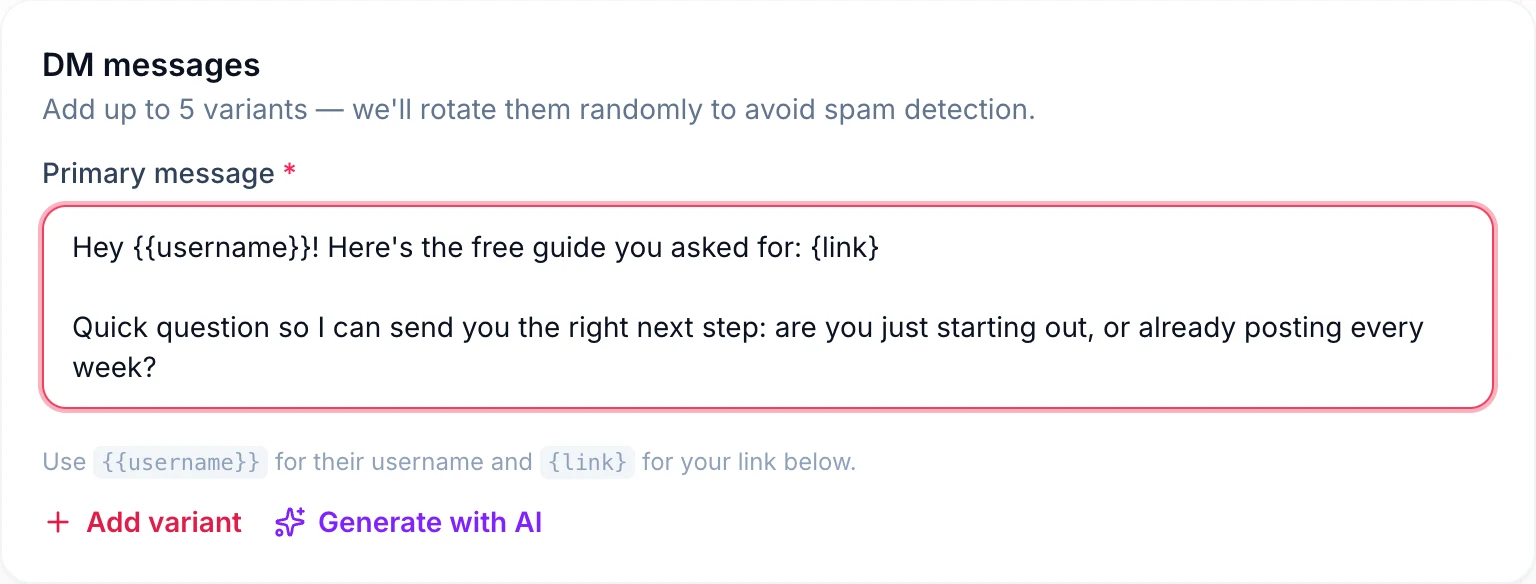
Here it is, {{username}}: {link} Quick question so I can send you the right next thing: are you just starting out, or already doing this?
Tip: the "beginner or experienced?" question segments your audience for free. Tag people by their answer.
3. Product or shop link
When to use it: a try-on, demo, haul or before-and-after Reel where people comment SHOP, LINK or the product name.
Hey {{username}}, here's the one from the Reel: {link} It's back in stock in every size right now. Want help picking yours?
Good choice, {{username}}. You can grab it here: {link} Which colour are you leaning towards?
{{username}}, here's the direct link so you don't have to hunt for it: {link} Any questions on sizing or shipping, just reply.
Tip: product links opened inside Instagram's in-app browser often lose saved logins and cards. See how to open Instagram links in the right app before you send people to checkout.
4. Discount code
When to use it: launches, flash sales and "comment CODE for 15% off" posts.
You're in, {{username}}. Use code INSTA15 for 15% off at checkout: {link} It's valid until Sunday at midnight.
Here's your code, {{username}}: WELCOME10. It takes 10% off your first order here: {link} Anything you've had your eye on?
{{username}}, this one is just for people who commented: FLASH20 for 20% off for the next 48 hours. Shop here: {link}
Tip: always state the deadline in the DM. A code without a date gets saved and forgotten.
5. Public comment replies
When to use it: alongside any comment-to-DM flow. A short public reply under the comment tells everyone else scrolling that asking works, which brings in more comments.
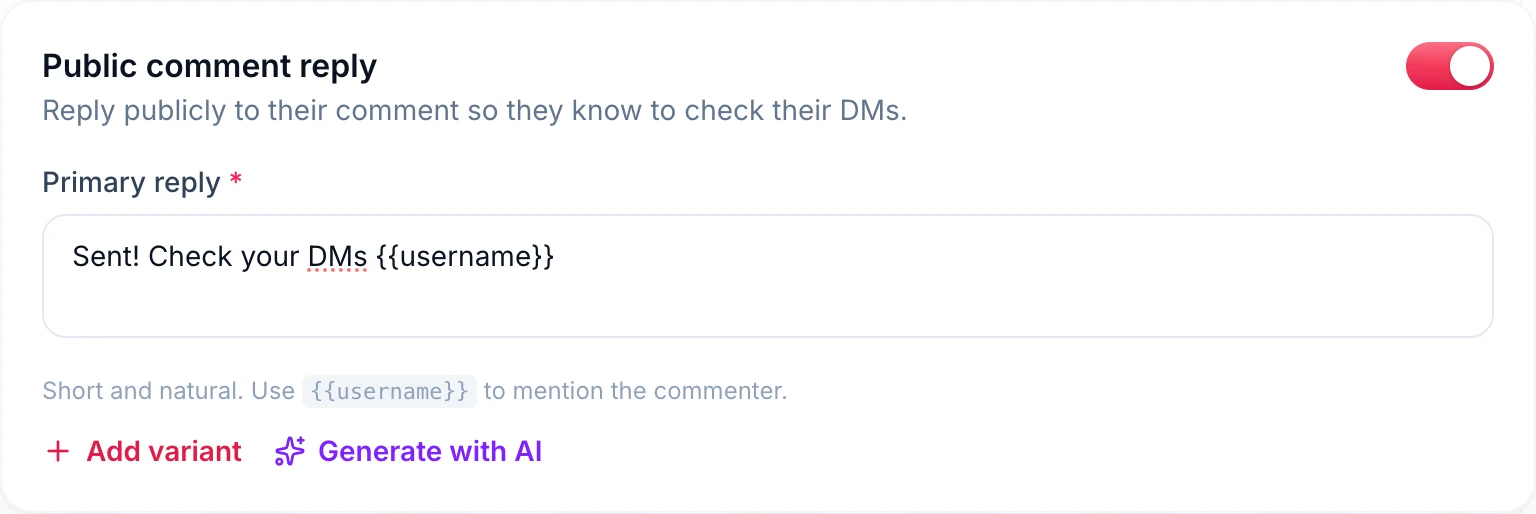
Sent! Check your DMs {{username}}
Just sent it to you, {{username}}. Check your inbox.
On its way to your DMs, {{username}}.
Done! Look in your message requests if you don't see it, {{username}}.
Check your DMs, {{username}}. Enjoy!
Tip: rotate at least three public replies. A comment section filled with the exact same sentence looks automated to people and to Instagram.
Booking, qualification and email capture templates
For coaches, consultants, agencies and service businesses, the DM is where a stranger becomes a lead. These templates move people towards a call or onto your list without sounding pushy.
6. Book a call (coaches and services)
When to use it: a post about a client result or a common mistake, with a keyword like CALL, COACH or AUDIT.
Hey {{username}}, thanks for reaching out. You can grab a free 20-minute call with me here: {link} Before we talk, what's the biggest thing holding you back right now?
{{username}}, happy to help. Here's my calendar: {link} Pick any slot that suits you, and reply with one line about your goal so I can prepare.
Hi {{username}}. Quick question before I send a booking link: are you looking to start in the next month, or just exploring for now?
Thanks {{username}}. I only take [number] new clients a month, so here's the link to check if we're a fit: {link}
Tip: the third template asks first and sends the link after they answer. It filters out tyre-kickers and keeps your calendar for serious leads.
7. Email capture
When to use it: waitlists, newsletters, launches and any freebie you want to deliver by email.
Hey {{username}}, I'd love to send you the full guide. What's the best email for it?
{{username}}, the waitlist is open. Reply with your email and you'll be the first to know when doors open.
Thanks {{username}}. The workbook is a bit big for DMs, so reply with your email and I'll send it straight over.
Tip: ask for the email as a direct question and nothing else in the same message. A single clear ask gets the most replies.
8. Follow-up after they reply
When to use it: the message that goes out once someone has answered you, for example after they send their email, or when they reply with a keyword to your question.
Got it, thanks {{username}}. It's on its way to your inbox now. Check your promotions tab if you don't see it in five minutes.
Perfect, {{username}}. Here's the next step I mentioned: {link}
Thanks for sharing that, {{username}}. That's exactly what the second half of the guide covers. Here it is: {link}
Tip: the reply restarts Instagram's 24-hour messaging window, so this is the best moment to send your most useful link.
Giveaway entry templates
When to use it: "comment anything to enter" or "comment and tag a friend" giveaways. Pair these with the Any Comment match mode so every comment counts.
You're entered, {{username}}. Winners are announced on [day]. Make sure you follow us so you don't miss the post.
Good luck, {{username}}! Your entry is in. Want double the chances? Share the post to your story and tag us.
{{username}}, you're in the draw. While you wait, here's 10% off anything in the shop with code THANKYOU: {link}
Entry confirmed, {{username}}. We'll DM the winner on [day], so keep an eye on your inbox.
Tip: the third template turns entrants who don't win into buyers. Give everyone something small.
Story reply and story mention templates
Stories don't have comments, so story replies and mentions are where your warmest followers talk to you. Instagram treats a reply to your story as a message, which means you can answer it straight away.
9. Story reply thank-you
When to use it: someone replies to your story with a keyword or answers a question you asked on screen.
Thanks for replying, {{username}}. Here's the link from today's story: {link}
Hey {{username}}, love that you watched. Did you catch the part about [topic], or should I send it over?
{{username}}, thanks for the reply. Here's the free resource I mentioned: {link} What would you like me to cover next?
Tip: a story that says "reply GUIDE to get it" works like comment-to-DM for your most engaged viewers.
10. Story mention thank-you
When to use it: a customer, client or fan tags your account in their story.
Thank you so much for the mention, {{username}}. It honestly made our day. Mind if we share it on our story?
{{username}}, thanks for tagging us. As a small thank-you, here's 10% off your next order with code SHARED10: {link}
We saw your story, {{username}}. Thank you for the shout-out. How are you getting on with it so far?
Thanks for the mention, {{username}}. Customers like you are why we do this.
Tip: asking permission to reshare is polite and gets a quick "yes", which opens the conversation.
DM keyword auto-replies: PRICE, INFO, HOURS and more
A DM keyword automation replies whenever someone messages you a word you choose. It is the fastest way to answer the questions you get twenty times a day. Put the keyword in your bio or story ("DM PRICE for our rates") and let the automation handle it.
11. Keyword reply templates
PRICE or PRICES:
Hi {{username}}, thanks for asking. You can see all our prices here: {link} Which one are you interested in? I can tell you more about it.
INFO:
Hey {{username}}, here's everything in one place: {link} Anything you can't find there, just ask and a real person will reply.
HOURS:
Hi {{username}}, we're open [days] from [time] to [time]. You'll find us at [address]. See you soon.
LINK:
Here you go, {{username}}: {link} That's the page everyone's been asking about this week.
MENU:
Hi {{username}}, here's this week's menu: {link} Would you like to book a table?
COURSE or JOIN:
{{username}}, here's everything about the course, including what's inside and who it's for: {link} What made you interested?
Tip: add close variations of each keyword, comma separated (PRICE, PRICES, PRICING, COST). Matching is not case sensitive, so you don't need capitals.
Welcome messages and away messages
12. Welcome message for new conversations
When to use it: someone opens a conversation with "hi", "hello" or "info" and you want an instant, friendly first reply. A welcome message on Instagram should tell people what you can help with and what happens next.
Hey {{username}}, thanks for messaging. What can I help you with today?
Hi {{username}}, welcome. Most people ask about [product], [service] or [topic]. Which one are you after?
Hey {{username}}, thanks for reaching out. A real person reads every message here and we usually reply within a few hours. In the meantime, our most-asked questions are answered here: {link}
Hello {{username}}, great to hear from you. Tell me a little about what you need and I'll point you in the right direction.
Tip: offering two or three options makes the reply easier to write than an open "how can I help?"
13. Away and out-of-office messages
When to use it: evenings, weekends, holidays or launch weeks when replies will be slower than usual.
Hi {{username}}, thanks for your message. We're away until [date], but we'll reply as soon as we're back. Urgent? Email us at [email].
Hey {{username}}, you've caught us outside our hours ([days], [time] to [time]). We'll get back to you first thing tomorrow.
Thanks {{username}}. I'm taking a few days off to recharge, back on [date]. Most answers are here in the meantime: {link}
Tip: always give a return date and one way to get help sooner. "We'll reply soon" with no date just leads to a second message.
FAQ auto-replies: shipping, sizes, delivery and returns
When to use it: set these as DM keyword automations for the questions shops hear most. Each one answers in a single message and points to the full policy.
SHIPPING: Hi {{username}}, we ship within [number] business days. Delivery usually takes [number] to [number] days after that. Full details are here: {link}
SIZE: Hey {{username}}, our pieces fit true to size. If you're between sizes, we suggest sizing up. The full size chart is here: {link} Tell me your usual size and I'll double-check for you.
DELIVERY: Hi {{username}}, you can track your order here: {link} Just enter your order number. If it hasn't moved in 3 days, reply and we'll look into it.
RETURNS: Hey {{username}}, you can return anything unworn within [number] days. Start your return here: {link}
INTERNATIONAL: Hi {{username}}, yes, we ship to [countries]. Shipping costs are shown at checkout before you pay: {link}
Tip: the word before the colon is the keyword to trigger it. Don't include it in the message itself.
Collab and brand inquiry replies
When to use it: creators who get partnership requests in DMs. Use a keyword like COLLAB, PR or PARTNER in your bio so brands know how to reach you.
Hi {{username}}, thanks for thinking of me. My media kit, rates and past partnerships are here: {link} What kind of campaign did you have in mind?
Hey {{username}}, I'd love to hear more. For collaborations, please email [email] with your brief, timeline and budget, and I'll reply within 2 business days.
Thanks for reaching out, {{username}}. I only work with brands I actually use, so tell me a little about the product and I'll let you know if it's a fit.
Tip: asking for budget up front saves hours of back-and-forth with brands that want free posts.
Local business templates: restaurants, salons, real estate and fitness
14. Restaurants and cafes
Hi {{username}}, thanks for your message. You can book a table here: {link} For groups over 8, reply with your date and we'll sort it out.
Hey {{username}}, today's specials and the full menu are here: {link} We're open until [time] tonight.
{{username}}, thanks for the comment. Show this message at the till this week for a free [item] with any main.
15. Salons, spas and beauty
Hi {{username}}, you can book your appointment here: {link} Tell me which treatment you're after and I'll suggest the best stylist for it.
Hey {{username}}, prices start from [price] for [service]. The full price list is here: {link}
Thanks {{username}}. We've got a few openings this week. Want the first one?
16. Real estate
Hi {{username}}, here are the full details and photos for this home: {link} Would you like to book a viewing?
Hey {{username}}, thanks for your interest. Are you looking to buy, rent or sell right now?
{{username}}, I can send you new listings in [area] before they go public. What's your budget and how many bedrooms do you need?
17. Gyms, trainers and fitness
Hey {{username}}, here's the full workout plan from the Reel: {link} What's your main goal right now: strength, fat loss or fitness?
Hi {{username}}, your free class pass is ready. Book your first session here: {link}
{{username}}, thanks for asking about coaching. Here's how it works and what it costs: {link} Want me to check if I have space this month?
Tip for local businesses: put your booking link in the first message. People who DM a local business usually want to book now, not chat.
Mistakes to avoid in Instagram auto-replies
- Making people ask twice. If the comment said "send the guide", the first DM must contain the guide, not "Thanks for your interest!"
- A link with no words. A bare URL looks like spam and gets no reply. Add a greeting and a question.
- Pretending to be a person when you're not available. It is fine for an automation to be warm, but don't promise "I'll reply in a minute" if nobody is watching the inbox.
- Too many questions. One question at the end. Every extra question lowers the chance of any answer.
- One wording for everyone. A viral post can send the same message hundreds of times. Use variants.
- Keywords people won't type. "Comment SPRINGCOLLECTIONGUIDE" loses people. One short, obvious word wins.
- Forgetting the 24-hour window. Instagram only lets businesses message someone within 24 hours of their last message. Automations can't cold message people later, so make the first reply count.
- Never testing. Comment or DM from a second account and read the message on a real phone before you promote the post.
How to set up these auto-replies in DM Automata
DM Automata is an Instagram DM automation tool built on Meta's official API. Every template on this page can be pasted straight into it. Here is how the pieces map.
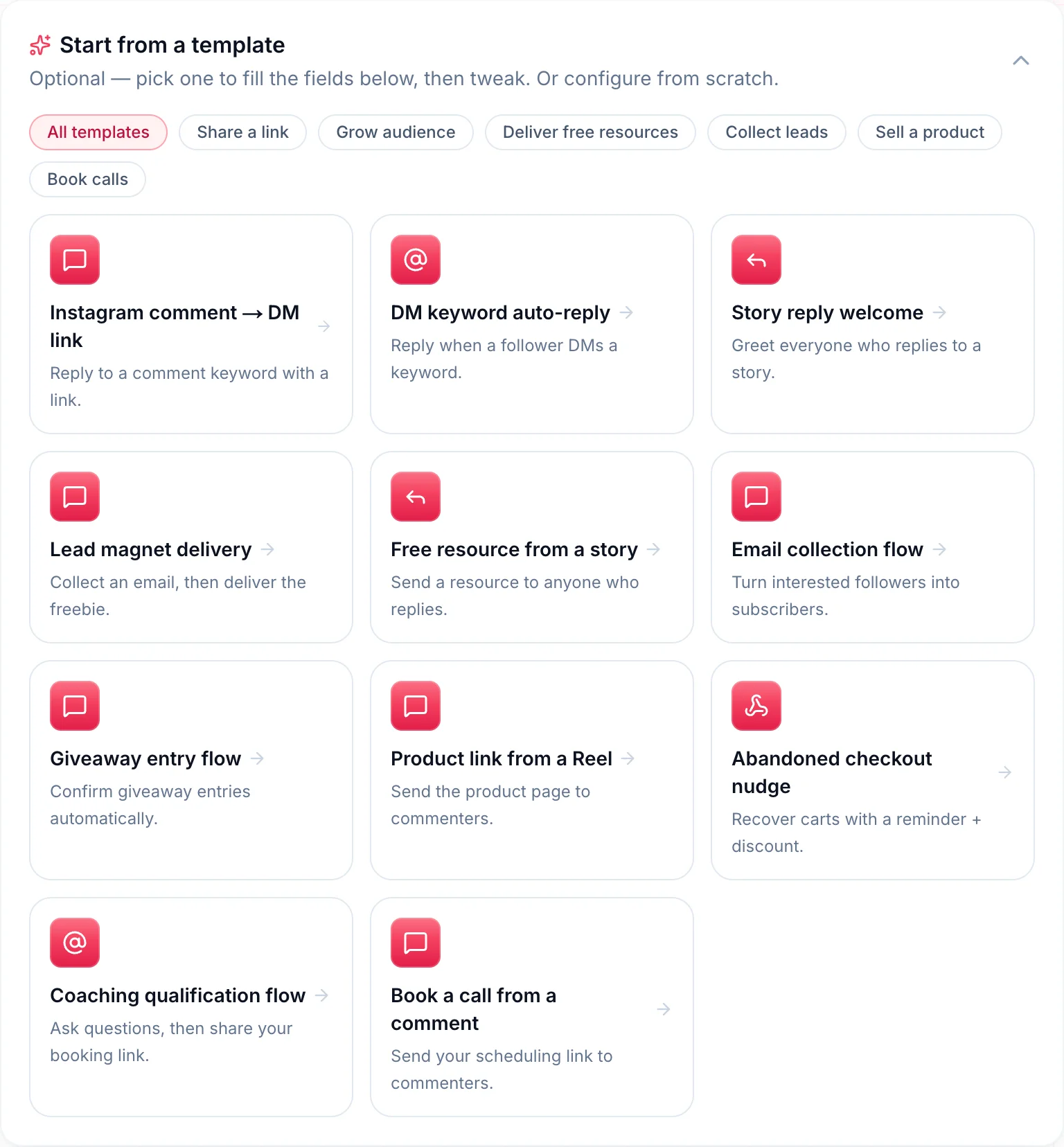
- Pick a template or a trigger. Start from one of eleven templates (comment to DM link, DM keyword auto-reply, story reply welcome, lead magnet delivery, free resource from a story, email collection, giveaway entry, product link from a Reel, abandoned checkout nudge, coaching qualification and book a call from a comment) or choose a trigger yourself: comments on a specific post or Reel, comments on any post, story replies, story mentions, DM keywords or a webhook.
- Set your keywords. Add them comma separated and choose Exact Match, Contains or Any Comment. Matching is not case sensitive.
- Paste the message. Keep
{{username}}and{link}exactly as written and add your URL in the link field. You can also add a tap-to-open button with up to 20 characters of text. - Add variants. Click Add variant to write up to five versions of the message. DM Automata picks one at random for each person.
- Or let AI draft them. Generate with AI writes several options from your offer, which you can edit into your own voice.
- Turn on the public reply. For comment triggers, switch on the public comment reply and add a few variants such as "Sent! Check your DMs {{username}}".
- Capture emails or sell. Switch on Collect email to save the address when someone replies with it and send your follow-up message automatically. For digital products, Sell in the DM sends each person their own Razorpay payment link; see how to sell digital products in the DMs.
- Tag and test. Add tags to segment contacts by campaign, then test from a second account.
Each person receives a given automation once, so a follower who comments three times on the same Reel gets one DM, not three. When they reply, the 24-hour window opens again and you can carry on the conversation yourself. DM Automata has a free plan, so you can try every template here before paying anything. Plans and limits are on the pricing page.
Frequently asked questions
What is a good auto reply message for Instagram?
A good auto reply gives the person what they asked for straight away, uses their name, and ends with one simple question. For example: "Hey {{username}}, here's the link you asked for: {link} Let me know what you think." Keep it to two to four short sentences.
How do I set up an auto reply message for my Instagram business account?
Connect your Instagram Creator or Business account to a tool built on Meta's official API, such as DM Automata. Choose a trigger (a comment keyword, a DM keyword, a story reply or a story mention), paste your message, add variants and switch it on. Test it from a second account before you promote the post.
What should an Instagram welcome message say?
Thank the person for messaging, say what you can help with, and tell them what happens next. Offering two or three options, such as pricing, bookings or shipping, makes it easy for them to reply.
Can I use emojis in Instagram auto replies?
You can, but a message works without them. Every template on this page is emoji-free and still reads warm, because the tone comes from plain, friendly wording and a personal greeting.
Can an Instagram auto reply send a link?
Yes. Automated DMs can contain links, and in DM Automata you can also add a tap-to-open button. Checkout links work best when routed so they open in the right app rather than in the Instagram in-app browser.
How long can I keep messaging someone after an auto reply?
Instagram lets a business message a person for 24 hours after that person last messaged them. Each time they reply, the window starts again, which is why ending your auto reply with a question matters.