How to sell digital products on Instagram through DMs: the 2026 playbook
Short answer
To sell digital products on Instagram, post content that shows the result, ask viewers to comment a keyword, and let an automation DM each commenter a checkout link, ideally after one useful tip and one qualifying question. With DM Automata you create the product in the Creator Store, connect Razorpay and turn on Sell in the DM, so every commenter gets their own payment link and is sent to the product right after paying. Every plan takes 0% platform fees.
- Use a price ladder: a free resource, then a low-ticket product, then a course or coaching.
- The funnel: Reel, keyword comment, instant DM, one question, checkout link, delivery, follow-up broadcast.
- Open checkout links in the real browser with App Opener so saved cards, UPI and wallets work.
- DM Automata charges 0% platform fees on every plan; only payment gateway fees apply.
Instagram is where your buyers already spend their attention. The problem has never been getting people interested in your presets, ebook or course; it is the gap between "I want that" and actually paying. This playbook closes that gap. It covers why selling in the DMs converts, how to choose a product and a price, the full funnel from Reel to receipt, a 7-day launch calendar, offer ideas by niche, the mistakes that cost sales, and what you really pay in platform fees. Everything is current for 2026.
What does "selling in the DMs" mean?
Selling in the DMs means using Instagram direct messages as your sales channel: a follower asks for something with a comment or message, you reply privately with value and an offer, and the checkout link arrives inside that same conversation. Instead of sending people to "link in bio" and hoping they find the right product, you meet them where they raised their hand.
Done by hand, it does not scale: you cannot reply to 400 comments on a Reel at midnight. Done with automation, every comment gets an instant, personal reply, and the payment link is already in the message. DM Automata is one of very few tools that lets creators sell a product inside the Instagram DM with a payment link generated for each buyer, so each order is tracked back to the person who commented.
Why Instagram DM sales convert better than a bio link
Three things make a DM the best place to close a sale on Instagram:
- Intent. Someone who types "PRESETS" under your Reel has told you, publicly, that they want the thing. That is a warmer lead than any anonymous bio-link click.
- Conversation. A DM can ask a question, answer an objection and suggest the right option. A sales page cannot ask "are you editing on your phone or on a laptop?"
- Trust. A message from the creator's own account, greeting the person by name, feels like a recommendation. A generic storefront feels like an ad.
There is also a practical reason: the bio link asks a follower to leave the Reel, open your profile, choose among several links and then navigate a store. Every step loses people. A comment-to-DM flow removes all of them. If you are new to the mechanics, start with our complete comment-to-DM setup guide, then come back here for the selling layer.
Choosing what to sell: the price-point ladder
A price-point ladder is a sequence of offers at rising prices, where each step earns the trust needed for the next one. Most creators who sell well on Instagram run three rungs:
| Rung | What it is | Examples | Job it does |
|---|---|---|---|
| Freebie | Free, delivered instantly by DM | Checklist, 3 sample presets, mini guide, swipe file | Turns a viewer into a contact you can reach again |
| Low-ticket | An impulse-level price for your audience | Preset pack, template bundle, ebook, recipe book, workbook | Turns a contact into a buyer; the first purchase is the hardest |
| Core offer | A bigger price with a bigger result | Video course, cohort, 1:1 coaching, paid community | Where most of the revenue comes from |
If you only have one product today, that is fine. Start with the rung that matches it and add a freebie in front. A freebie is not a giveaway for its own sake: it is how you build the list of people you will launch the paid product to.
What sells well in the DMs
- Presets and templates (Lightroom presets, Canva templates, Notion dashboards, Reels editing packs). Easy to demo in a Reel, delivered as a single link.
- Ebooks and guides. If you want to sell an ebook on Instagram, the DM is ideal: the Reel teaches one tip, the ebook contains the other forty.
- Courses. To sell a course on Instagram, lead with a free lesson or checklist, then offer the course to people who engaged with it.
- Coaching and calls. Higher price, so the DM should qualify first and sell second.
- Paid communities. A membership link or invite delivered after payment.
The Instagram DM sales funnel, step by step
This is the whole loop. Each step feeds the next, and each one can be automated.
- Content that shows the result. A before-and-after edit, a workout, a budget breakdown, a lesson. The content proves the product works without pitching it.
- A keyword call to action. "Comment PRESETS and I'll DM you the pack." One short word, said out loud, on screen and in the caption.
- Comment-to-DM. Every matching comment triggers a private reply within seconds, plus an optional public reply ("Sent, check your DMs") that shows others the keyword works.
- Deliver value first. For a freebie funnel, the first DM gives the free thing. For a direct sale, it gives a useful tip or a preview alongside the offer.
- Qualify with one question. "Do you edit on your phone or on desktop?" or "What is your goal for the next 90 days?" A reply opens Instagram's 24-hour messaging window and tells you which offer fits.
- The checkout link in the DM. Either a normal link to your checkout, or, with DM Automata's Sell in the DM, a payment link generated for that person.
- Delivery. Right after paying, the buyer is sent to the product: a Drive folder, a Notion page, a course login or a community invite.
- Follow-up broadcast. Leads who did not buy and buyers who might want the next rung get one well-timed message to a tagged segment.
Two rules keep this funnel healthy. Every DM ends with a question, because replies keep the conversation (and the 24-hour window) open. And every checkout link opens in the phone's real browser, which we cover below.
How to set it up in DM Automata
Here is the exact setup, using real screenshots from the product.
Step 1: Create the product in the Creator Store
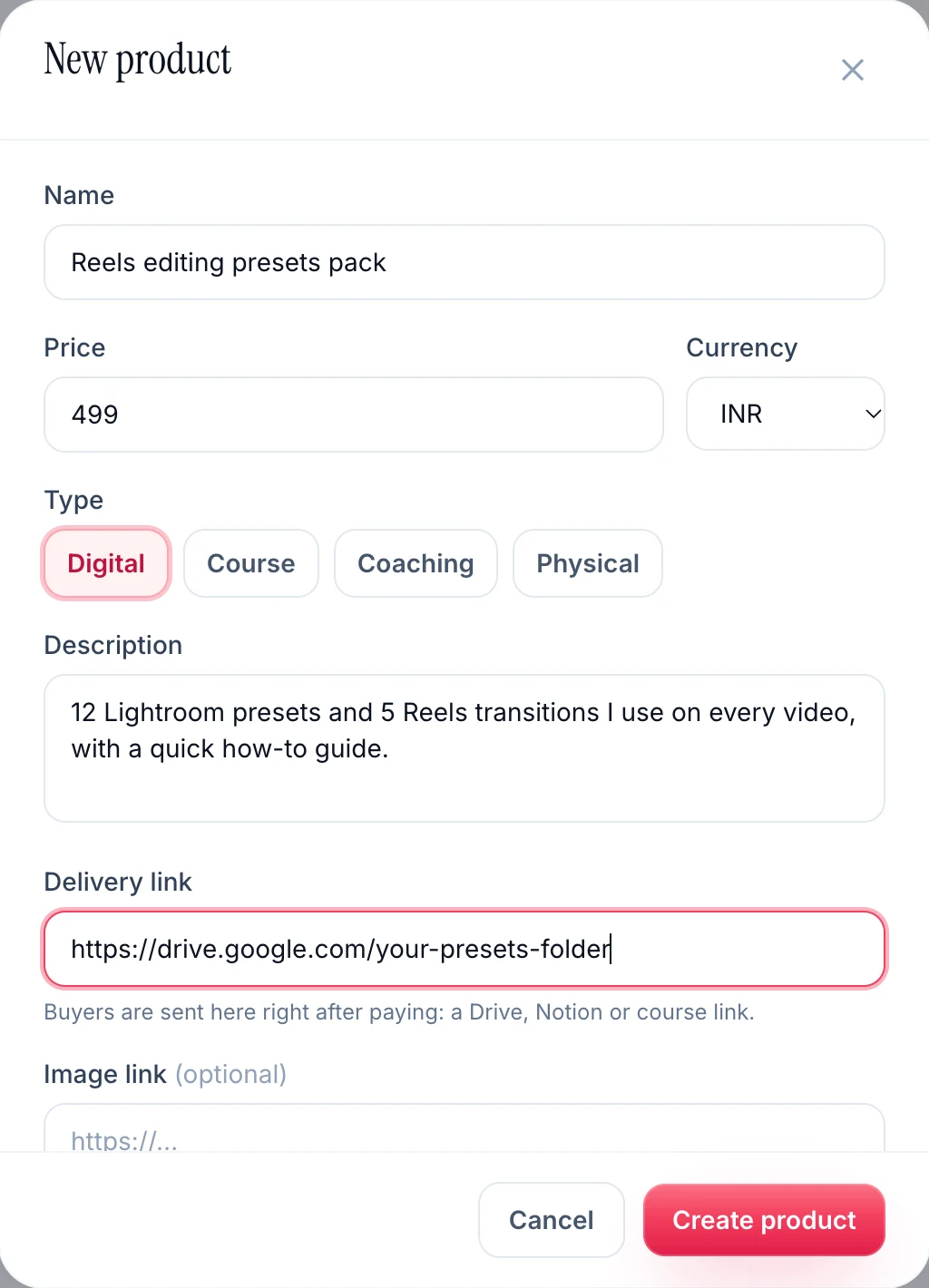
Open Store and click New product. Give it a name, a price and a currency, pick a type (Digital, Course, Coaching or Physical), write a short description and, optionally, add an image. The most important field is the delivery link: buyers are sent there right after paying, so paste the Google Drive folder, Notion page or course link that contains the product. Every sale then shows up in the store's orders list.
The free plan includes one store product, which is enough to test a funnel end to end. Paid plans lift that limit to unlimited products, and every plan, Free included, takes 0% platform fees on your sales; only your payment gateway's own fees apply.
Step 2: Connect Razorpay
Go to Integrations and connect Razorpay. This is what lets DM Automata create payment links on your own Razorpay account, so the money goes straight to you. Razorpay is the gateway supported today; Stripe is coming soon. If Razorpay is not connected, your automations still work, they simply send a normal link button instead of a per-person payment link.
Step 3: Build the automation from a template
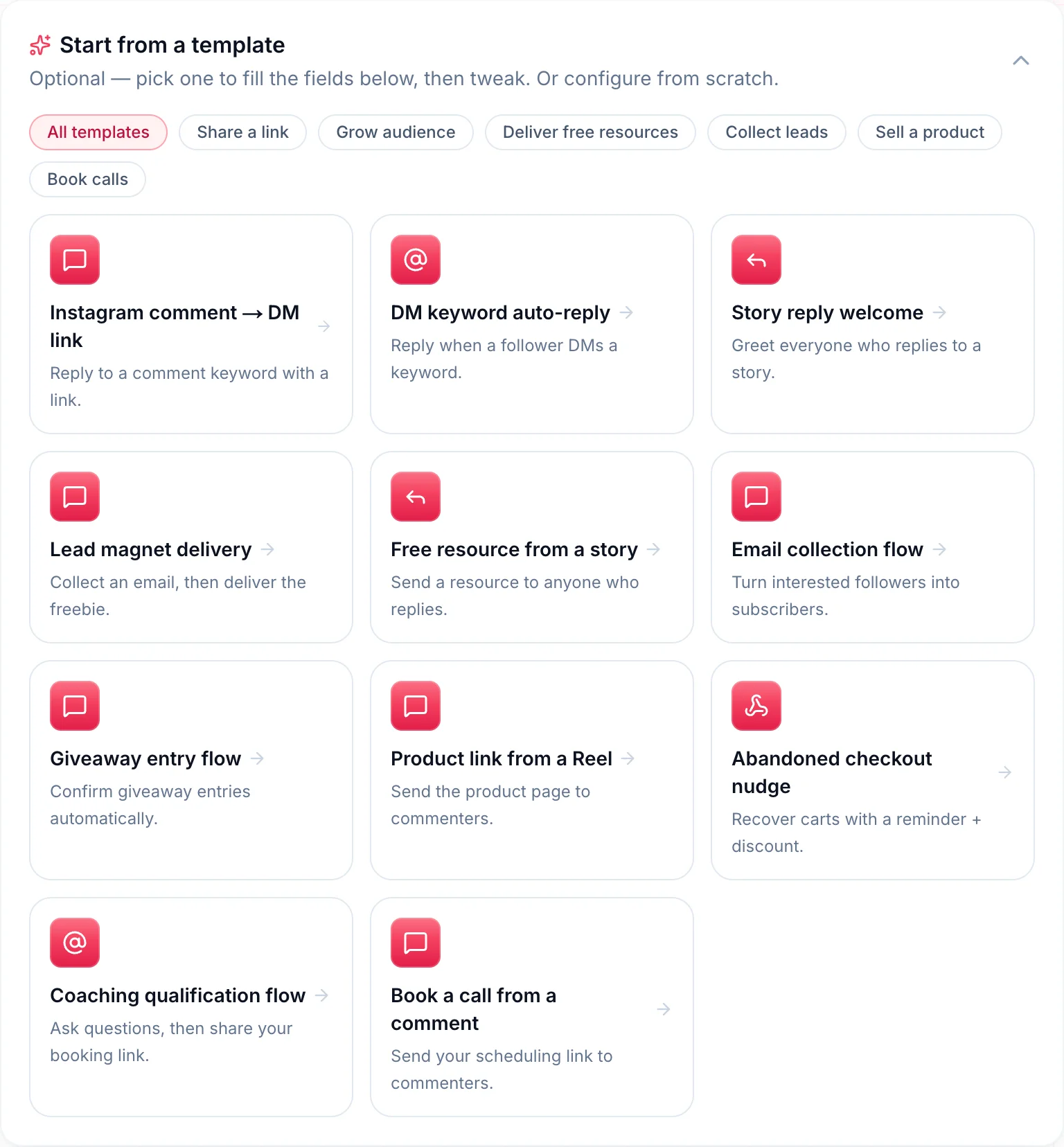
Click New automation, choose a specific Reel (best for a launch) or any post (best for an evergreen keyword), and start from a template. Product link from a Reel is the direct-sale flow. Lead magnet delivery is the freebie flow. Coaching qualification flow and Book a call from a comment suit higher-priced offers, and Abandoned checkout nudge gives you wording for people who looked but did not pay.
Set your keywords, write the message with {{username}} so it greets each person by name, and add up to five variants so no two commenters get the identical text. Turn on the public reply, and add tags such as presets-lead so you can reach this group again later. If you want an email list too, switch on Collect email.
Step 4: Switch on "Sell in the DM"
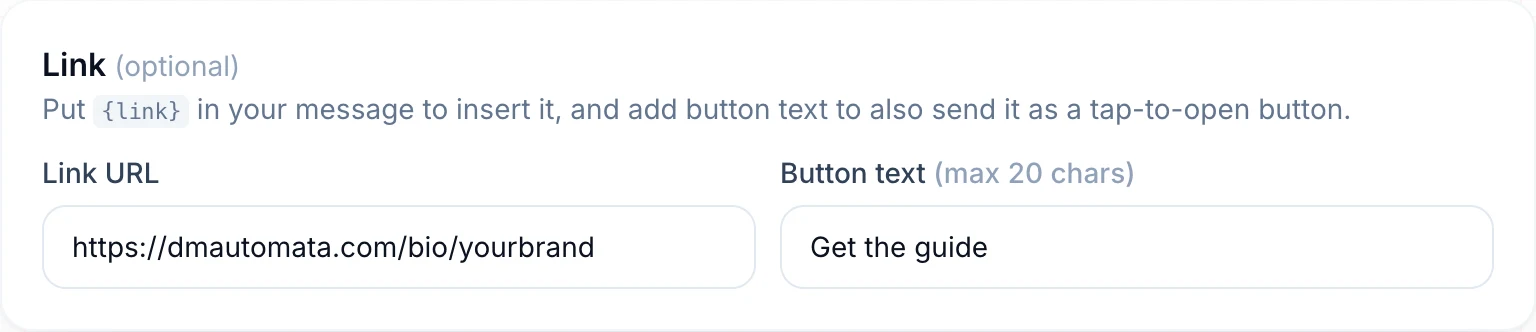
In the Sell in the DM section, pick the product you created. With Sell in the DM on, the DM button becomes a Razorpay payment link generated for each person, using your button text (or "Buy now" if you leave it blank). Because each commenter gets their own link, each order is tied to their Instagram handle. When they pay, the order is marked paid, the contact is marked as a customer, their email is saved if they entered one at checkout, and you get a "New sale" notification. After paying, the buyer is sent straight to the product's delivery link.
Step 5: Make checkout open in the real browser
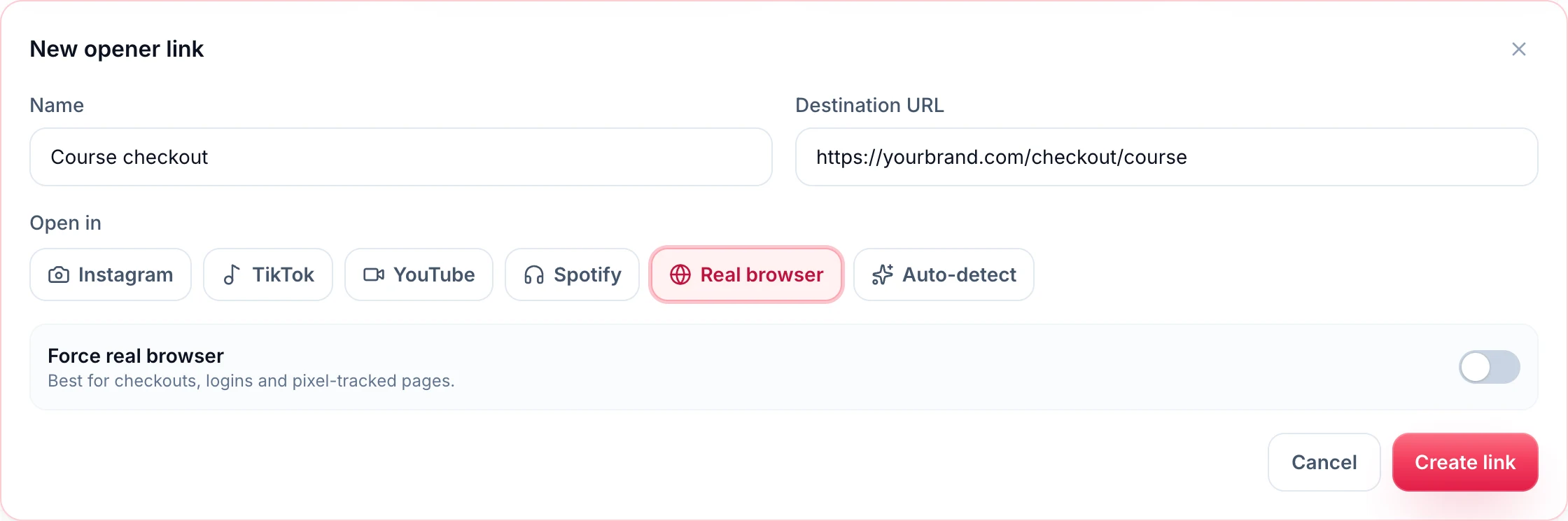
Links tapped inside Instagram open in its in-app browser, where saved cards, UPI apps, wallets and logins often do not work. That is a quiet sales killer. App Opener fixes it: create a link, choose Real browser and switch on Force real browser, which is the setting meant for checkouts. Use it for any checkout link you send in a DM or put in your bio. Our guide to opening Instagram links in the right app explains how it works on iPhone and Android.
Step 6: Put the store in your bio link
Not everyone comments. Your smart bio link works as a small storefront: add a product block for your low-ticket offer, a link to the freebie, and a "DM me" button for coaching enquiries. The bio link catches the people who come to your profile; the automations catch the people who stay on the Reel.
Step 7: Tag and broadcast
Because every automation tags the people who trigger it, you can later send a broadcast to a tag: everyone who asked for the free guide, for example, gets a message when the course opens. Instagram only allows these messages within 24 hours of the person's last message to you, so broadcasts work best right after a conversation, which is another reason every DM should end with a question.
A 7-day launch calendar you can copy
Use this when you release a new product or reopen enrolment. It assumes one Reel a day and one automation per Reel.
| Day | Content | Keyword and automation | Goal |
|---|---|---|---|
| Day 1 | The problem: a common mistake your audience makes | GUIDE, Lead magnet delivery, tag launch-lead | Build the launch list |
| Day 2 | A quick win: one tip from the product | GUIDE again (any post), same tag | More leads, more replies |
| Day 3 | Behind the scenes: how the product was made | Story reply automation: "Reply EARLY for first access" | Identify the warmest people |
| Day 4 | Launch Reel: the result the product delivers | Product link from a Reel with Sell in the DM on | First sales |
| Day 5 | Answer the top objection (time, price, skill level) | Same product automation, new keyword | Convert fence-sitters |
| Day 6 | Show what is inside: a walkthrough | Broadcast to launch-lead contacts who messaged in the last 24 hours | Reach the list |
| Day 7 | Last call: the launch price or bonus ends tonight | Abandoned checkout nudge wording in the DM | Close the launch |
After day 7, leave the product automation live. Reels keep being discovered for weeks, and a keyword that sells during the launch keeps selling afterwards.
Pricing psychology for DM sales
- Keep the first purchase easy. A low-ticket product is a decision someone can make in the DM without "thinking about it". The goal is the first yes, not the biggest order.
- Price in the buyer's currency. Set the store price in the currency your audience pays in. A price that needs mental conversion slows people down.
- Anchor with the bigger offer. Mentioning that the full course exists makes the preset pack feel like an obvious small step.
- Use real deadlines only. "Launch price until Sunday" works when it is true. Fake countdowns erode the trust that makes DM selling work.
- Bundle instead of discounting. Adding a bonus template keeps your price intact and gives people a reason to buy now.
- Say the price in the DM. A button that hides the price until checkout creates a surprise. State it plainly next to the link.
Offer ideas by niche
These are example funnels to adapt, not results from real accounts.
Fitness
Freebie: a 7-day home workout plan (keyword PLAN). Low-ticket: a 4-week program PDF or app template. Core: monthly online coaching, sold after a "What's your goal?" qualification question.
Photography and video
Freebie: three sample presets (keyword PRESETS). Low-ticket: a full preset or LUT pack, like the "Reels editing presets pack" in the screenshot above. Core: an editing course or portfolio review.
Personal finance
Freebie: a budget spreadsheet (keyword BUDGET). Low-ticket: a money-planning workbook or Notion dashboard. Core: a cohort course. Keep claims educational and avoid promising returns.
Education and tutoring
Freebie: a formula sheet or exam checklist (keyword NOTES). Low-ticket: full revision notes or a question bank. Core: a live batch or 1:1 sessions, booked with the "Book a call from a comment" template.
Beauty and skincare
Freebie: a routine builder (keyword ROUTINE). Low-ticket: a makeup masterclass recording or a skin-type guide. Core: a paid community or a personal consultation.
Need the exact DM wording for any of these? Our Instagram auto-reply message examples has copy-and-paste scripts for freebies, product links and booking flows.
Platform fees: what selling actually costs
Every sale pays two kinds of fee: the payment gateway fee (the card, UPI or wallet processing charge, which nobody avoids) and the platform fee (what the store software takes on top). The platform fee is where tools differ.
| Option | Platform fee on sales | Monthly cost | Notes |
|---|---|---|---|
| DM Automata | 0% on every plan | Free (1 product); Pro from $14/mo for unlimited products | Same plan includes comment-to-DM, Sell in the DM, bio link and App Opener; Pro adds broadcasts |
| Gumroad | 10% + $0.50 per direct sale | $0 | No monthly fee; the platform fee is taken from every sale |
| Stan Store | 0% | Creator plan $29/mo | Fixed monthly fee; the Creator Pro plan is $99/mo |
To see what that means, take an example: 100 sales of a $20 ebook in a month. On a 10% + $0.50 platform fee, $250 of the $2,000 goes to the platform before gateway fees. On a 0% platform fee, that $250 stays with you. With DM Automata you keep 100% of the sale price on every plan, minus only your payment gateway's fee, and the same plan also covers your DM automations (25,000 DMs a month on Pro), your bio link and App Opener. Plan details are on the pricing page.
Mistakes that cost DM sales
- Pitching in the first line. "Buy my course" to someone who asked for a free checklist feels like a bait-and-switch. Deliver what you promised, then offer.
- Sending checkout into the in-app browser. If saved cards and UPI apps don't appear, people abandon. Route checkout links through App Opener with Force real browser.
- A DM that is only a link. No greeting and no question means no reply, no 24-hour window and no chance to answer an objection.
- A keyword nobody can spell. One short, obvious word per offer.
- No delivery link. A buyer who pays and then waits for you to wake up is a refund request. Fill in the delivery link on every product and test it.
- Never following up. Most people do not buy the first time they see an offer. Tag every lead and broadcast to them while the conversation is fresh.
- Not testing the full purchase. Comment from a second account, tap the button, pay a real small amount if you can, and confirm you land on the product.
Is DM selling right for you?
If your Reels already get comments asking "where can I get this?", you are leaving sales in the comment section. Selling in the DMs works best for creators with an engaged audience and a product that can be demonstrated in a short video: presets, templates, guides, programs and coaching. If you mainly sell physical stock with complex shipping, a full e-commerce store is still the better home, and the DM becomes the way you send people to it.
Ready to try it? Create a free DM Automata account (1,000 DMs a month, no card needed), add your first product to the Creator Store, and pick the "Product link from a Reel" template. Your next Reel can be your first DM sale.
Frequently asked questions
How do I sell digital products on Instagram without a website?
Create the product in a store that hosts the checkout for you, such as the DM Automata Creator Store, and add a delivery link to your Drive, Notion or course page. Then sell it through comment-to-DM automations and your bio link. You do not need your own website.
Can people pay inside an Instagram DM?
They pay through a link sent in the DM. With DM Automata and Razorpay connected, Sell in the DM generates a payment link for each person, so the order is tied to their Instagram handle. For the smoothest checkout, open it in the real browser rather than Instagram's in-app browser.
Is it allowed to sell through Instagram DMs with automation?
Yes, when the tool uses Meta's official Instagram API and only messages people who commented or messaged you first. DM Automata is an approved Meta Tech Provider and works this way. Avoid tools that ask for your Instagram password or send cold DMs.
What are the best digital products to sell on Instagram?
Products you can demonstrate in a short video: presets and templates, ebooks and guides, workout or study plans, online courses, coaching and paid communities. Start with a low-ticket product and a free resource in front of it.
How much does DM Automata charge per sale?
Nothing, on any plan: the Creator Store has 0% platform fees. Your payment gateway (Razorpay) charges its own processing fee. The free plan includes one store product so you can test the funnel; Pro and Business are unlimited.
Does DM Automata support Stripe?
Stripe is coming soon. Today, per-person payment links in the DM use Razorpay. Without a connected gateway, automations send a normal link button to any checkout you choose.