
Instagram comment-to-DM automation: the complete 2026 setup guide
Short answer
Instagram comment-to-DM automation sends a private message to anyone who comments a keyword on your post or Reel. You pick the post, choose a keyword such as GUIDE, write the DM and connect a tool that uses Meta's official Instagram API. Every matching comment then gets your link, freebie or offer in their inbox within seconds, 24 hours a day.
- Setup takes about five minutes with DM Automata, and it's free for up to 1,000 DMs a month.
- Needs an Instagram Creator or Business account. No Facebook Page needed with Instagram Login.
- Use the Contains match mode with 2 or 3 short keywords, and end every DM with a question.
- Set a 2 to 5 second send delay and an hourly cap to keep viral posts safe.
This is the most complete guide to comment-to-DM on the web: what it is, why it outperforms a link in bio, the exact setup inside a real builder (with screenshots, not mockups), the Instagram rules most guides skip, and the mistakes that quietly kill reply rates. Bookmark it; everything here is current for 2026.
What is comment-to-DM automation?
Comment-to-DM automation is a trigger-and-reply flow: a public comment containing a keyword triggers an automatic private message to the person who wrote it. It is the same thing creators do manually when they end a Reel with "comment LINK and I'll send it to you", except software does the sending, instantly and without limits on your time.
Under the hood, Instagram notifies the tool every time someone comments on your account. The tool checks the comment against your keyword, and if it matches, it sends a private reply: a DM that Instagram links to that exact comment. Because the person started the interaction by commenting, Instagram allows the message, and it lands in their main inbox rather than as a cold message request.
Why comment-to-DM beats "link in bio"
"Link in bio" asks a follower to stop scrolling, open your profile, find the right link among several, and tap it. Every one of those steps loses people. Comment-to-DM removes all of them:
- Zero friction. The follower types one word without leaving the Reel. The link arrives while their interest is at its peak.
- The algorithm rewards it. Every keyword comment is engagement on your post. A Reel that asks for comments gets more of them, and more comments mean more reach.
- You capture a contact. Each person who comments becomes a contact you can tag, segment and message again when they reply. A bio-link click is anonymous; a DM thread is a relationship.
- The DM gets read. Instagram DMs are opened far more reliably than email, because they arrive in an app people already have open.
- It works on every post. Your bio holds one link. Each post can have its own keyword and its own offer.
That is why comment-to-DM has become the default growth play for creators, coaches and online brands on Instagram. If you post content that people want more of, it is the single highest-leverage automation you can switch on.
What you need before you start
- An Instagram professional account (Creator or Business). Personal accounts can't use Meta's messaging API; switching is free in Instagram settings and takes a minute.
- A tool built on the official Instagram API. It should connect with the "Continue with Instagram" login and never ask for your password. DM Automata is an approved Meta Tech Provider and uses Instagram Login, so you don't even need a Facebook Page, which many older tools still require.
- Allow access to messages turned on in the Instagram app (Settings, then Messages and story replies, then Message controls, then Connected tools). Without it, no tool can send DMs for you.
- Something worth sending: a guide, a discount code, a product page, a booking link or a free resource. The better the offer, the more comments you get.
How to set up comment-to-DM in five minutes (step by step)
These are real screenshots from the DM Automata builder. Other tools work in a similar way, but the field names and options below are exactly what you'll see in DM Automata.
Step 1: Connect your Instagram account
Sign up, then click Continue with Instagram. You'll approve the permissions on Instagram's own screen, and your account is connected. Your password never touches DM Automata.
Step 2: Choose where the automation listens
Click New automation and pick the scope. A specific post is best for campaigns: one Reel, one keyword, one offer. Any post listens on every post you publish, which is ideal for an evergreen keyword like LINK. Account-wide covers story replies, story mentions and DM keywords rather than comments.
Step 3: Start from a template (optional)
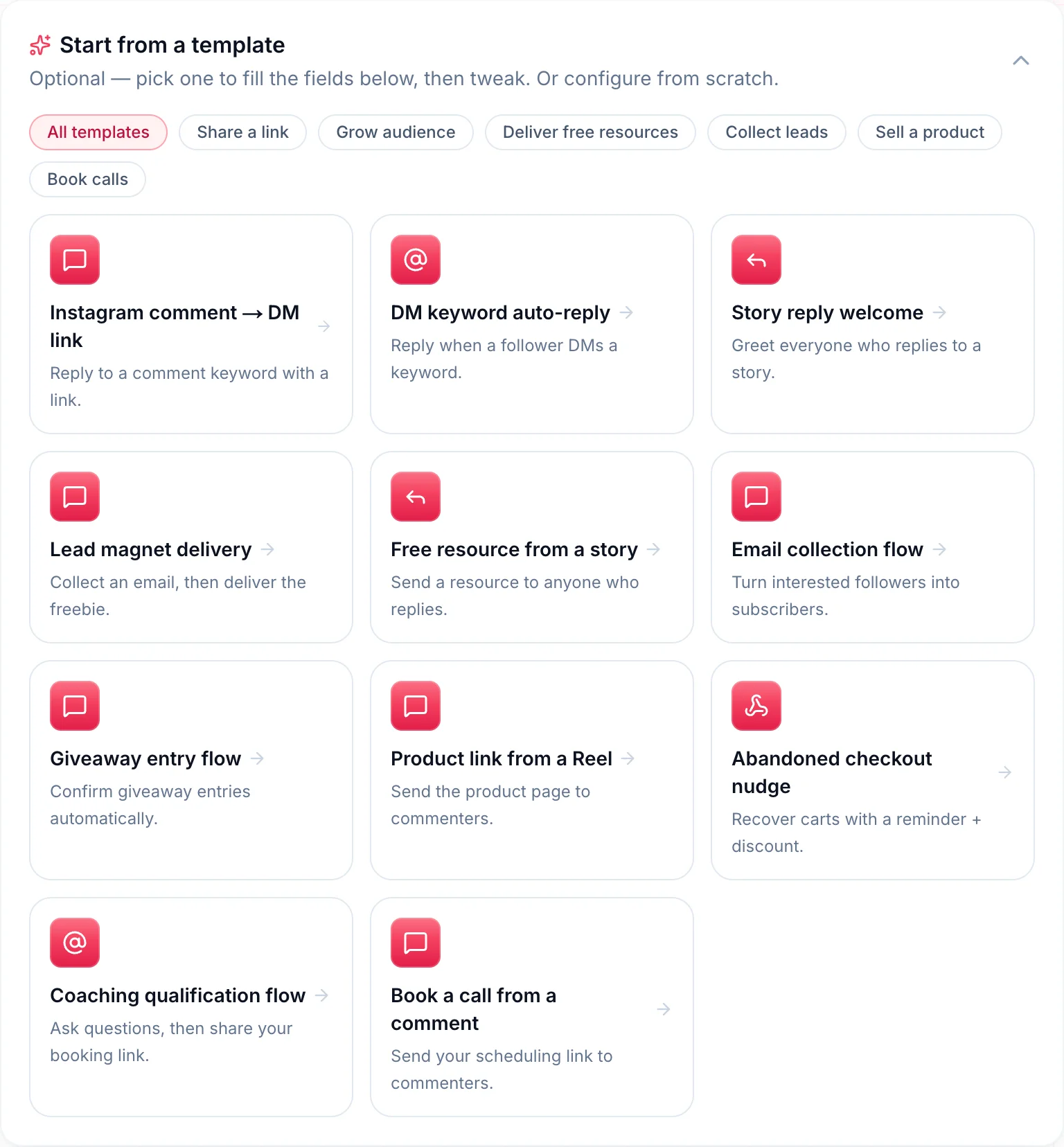
DM Automata ships eleven templates for the flows creators actually run: comment to DM link, lead magnet delivery, giveaway entries, product link from a Reel, book a call from a comment, coaching qualification and more. Pick one and every field fills in; you only tweak the wording.
Step 4: Set your keywords and match mode
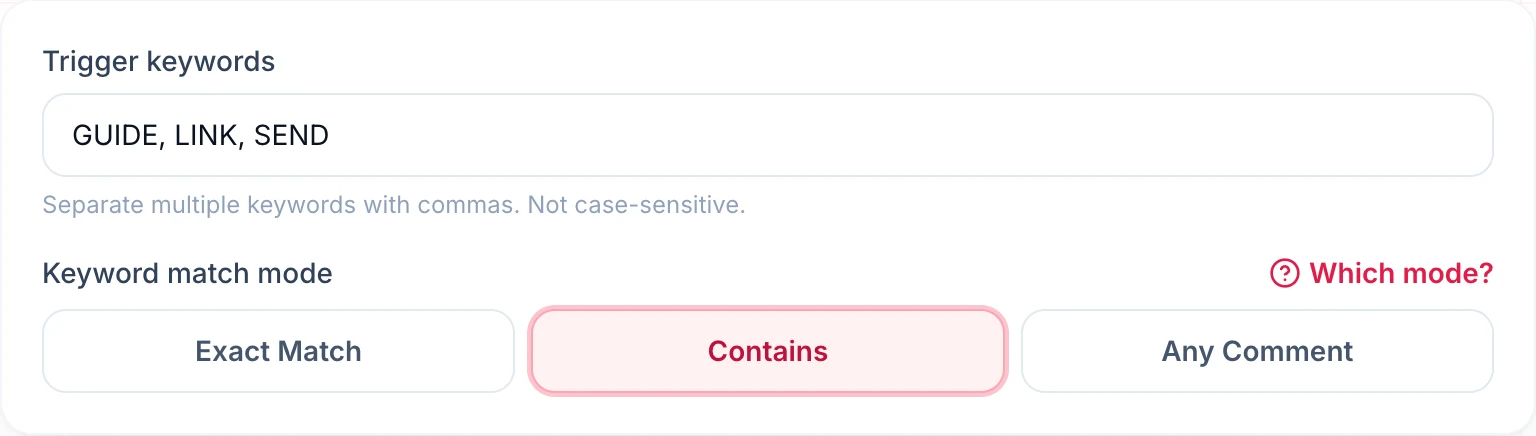
Enter one or more keywords separated by commas. Matching ignores upper and lower case, so guide, Guide and GUIDE all count. Then choose how strictly to match:
| Match mode | Fires when | Use it for |
|---|---|---|
| Exact Match | The whole comment is the keyword, e.g. "GUIDE" | Posts with lots of general chatter, where you only want deliberate requests |
| Contains | The keyword appears anywhere, e.g. "guide please!" | Almost every campaign. It catches natural comments and is the default |
| Any Comment | Anyone comments anything | Giveaways and "comment anything to enter" posts |
Our recommendation: use Contains with two or three keywords people might naturally type (GUIDE, LINK, SEND), and avoid common words like "love" or "great" that appear in ordinary compliments.
Step 5: Write the DM
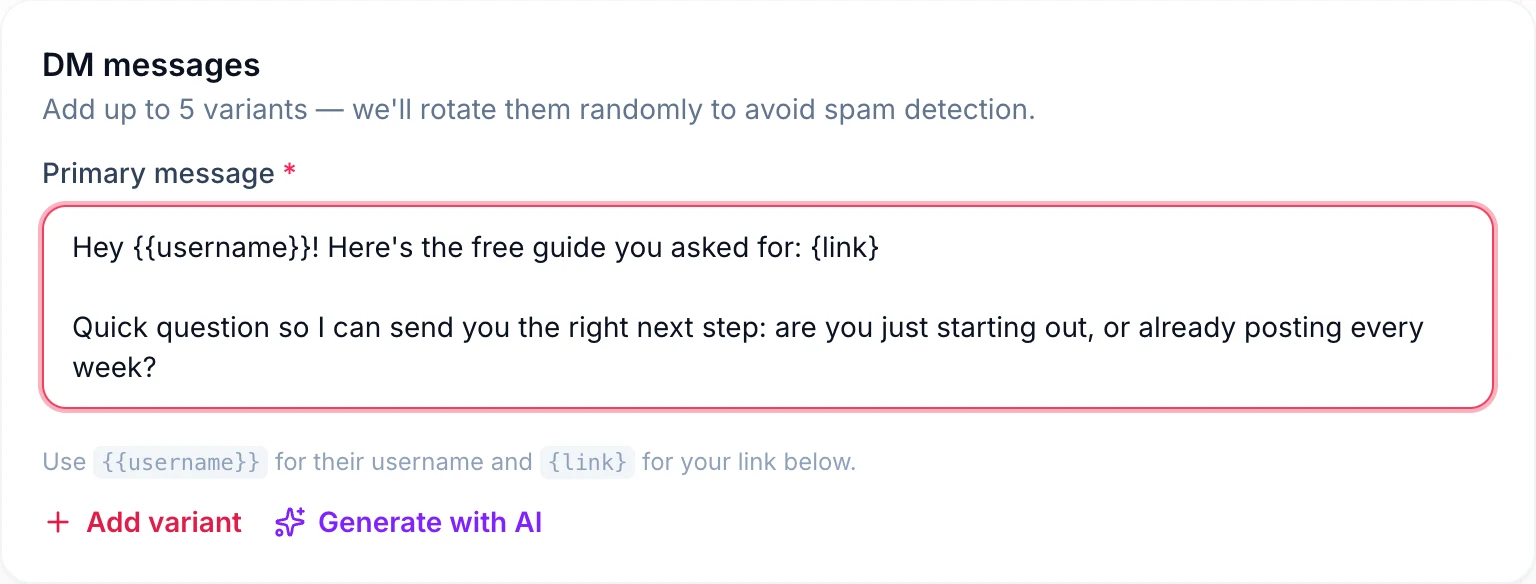
This is where most of your results come from. Use {{username}} to greet the person by name and {link} to drop in your link. Keep it short, deliver what you promised in the first line, and end with a question. A question matters for two reasons: replies turn a one-off message into a conversation, and once someone replies, you can keep messaging them for the next 24 hours.
You can add up to five message variants. DM Automata rotates them at random, so no two commenters get an identical message. If writing isn't your thing, Generate with AI drafts three options for you.
Step 6: Turn on a public reply
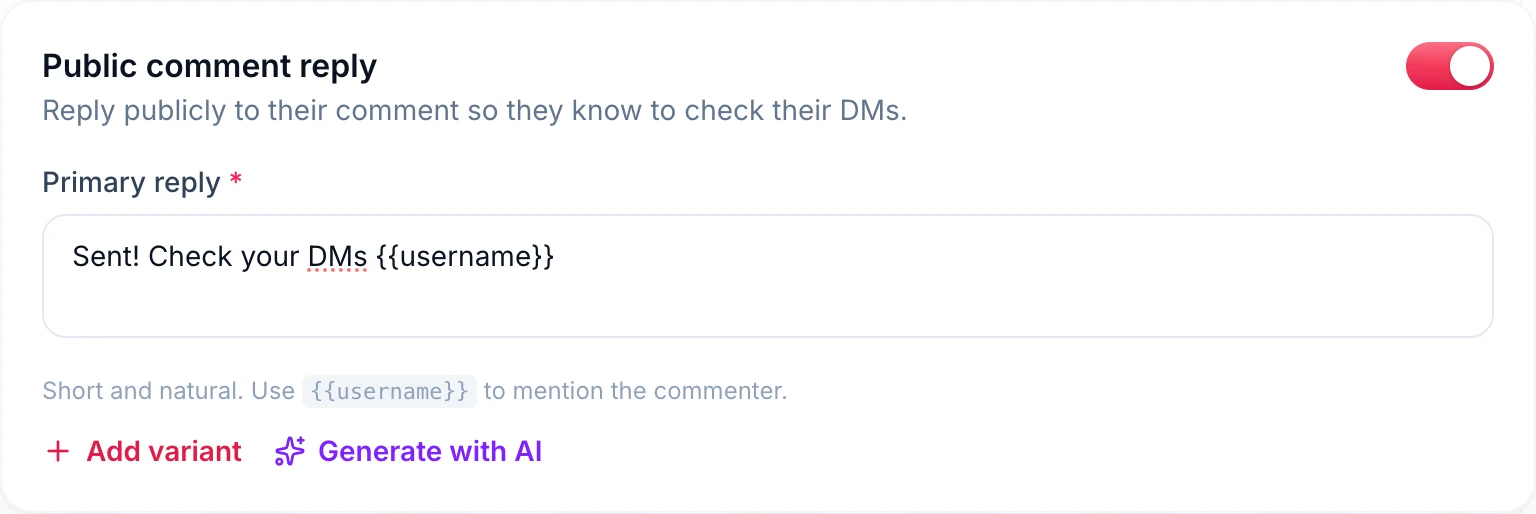
A short public reply under the comment, such as "Sent! Check your DMs", does three jobs. It reassures the commenter, it shows everyone else reading the comments that the keyword works (so more people comment), and it adds engagement to the post. Add a couple of variants here too so the comment section doesn't fill with identical replies.
Step 7: Add the link and a button
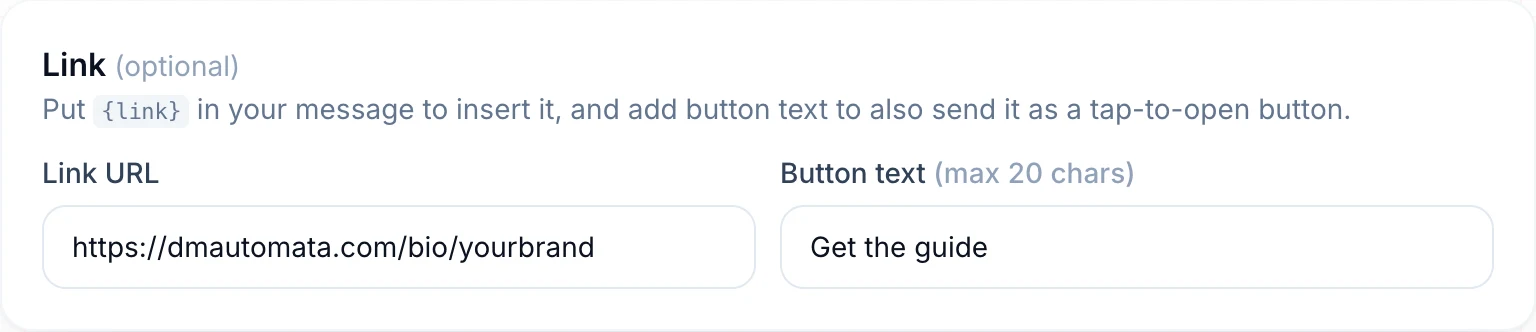
Paste your link and add button text of up to 20 characters. The link then arrives both inside the message and as a tap-to-open button, which gets noticeably more taps than a plain URL. Tip: if your link goes to a checkout or sign-up page, send it through App Opener so it opens in the phone's real browser, where saved logins and payment methods work.
Step 8: Tag, collect emails and sell (optional)
Three optional switches turn a simple link drop into a lead engine:
- Tag contacts: everyone who triggers the flow gets tags like lead or free-guide, so you can filter them later or send them a targeted broadcast.
- Collect email: when the person replies with an email address, DM Automata saves it to their contact and sends a follow-up message you write.
- Sell in the DM: connect Razorpay and the DM button becomes a payment link generated for each commenter, so people can buy without leaving Instagram.
Step 9: Set the safety controls and go live
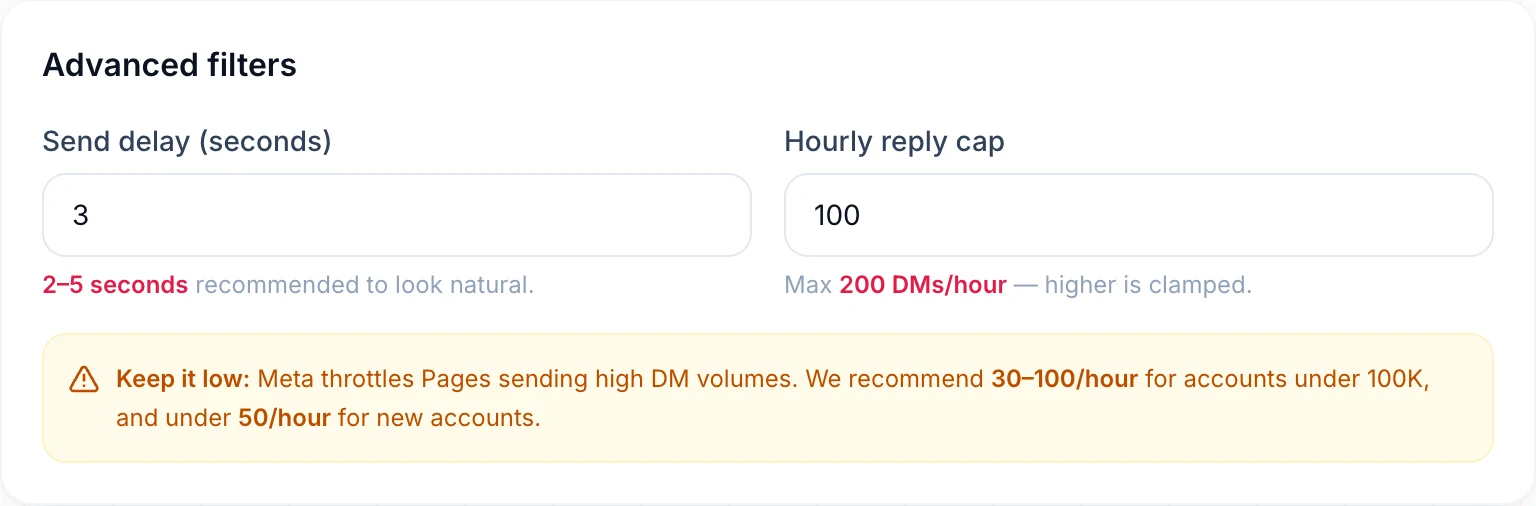
Set a send delay of 2 to 5 seconds so replies don't look robotic, and an hourly cap (30 to 100 an hour for most accounts, under 50 for new ones). Switch on Only DM followers if you want the freebie to reward following. Then save, flip the automation to Live, and test it by commenting your keyword from a second account.
The Instagram rules every comment-to-DM tool must follow
Most guides skip this part, and it is the reason automations "stop working". These are Meta's rules for the official API, and they apply to every legitimate tool:
- One private reply per comment. The first DM is sent as a reply to that specific comment, and Instagram allows one per comment. DM Automata also sends only one message per person per automation, so nobody gets spammed if they comment twice.
- Comments must be recent. Private replies work on recent comments (Meta allows a window of days, not months), which is why automations fire in real time rather than on your back catalogue.
- The 24-hour window. After the person replies to your DM, you can message them freely for 24 hours. After that, you wait for them to write again. This is why ending your DM with a question is so powerful.
- No password-based tools. Tools that log in with your username and password break Instagram's terms and put your account at risk. Official-API tools never see your password. We cover this in detail in Is Instagram DM automation allowed?
5 comment-to-DM flows that work in 2026
1. The free resource drop
Post: a Reel with three quick tips. Call to action: "Comment GUIDE for the full 10-step checklist." DM: the checklist link plus "What are you working on right now?" This is the classic, and it builds your contact list faster than anything else.
2. The product link
Post: a try-on, demo or before-and-after. Keyword: SHOP or LINK. DM: the product page, routed through App Opener so checkout works, plus a limited-time code.
3. The booking funnel
Post: a client result or a common mistake in your niche. Keyword: CALL. DM: one qualifying question first, then your scheduling link. Coaches and agencies use this to fill calendars without cold outreach.
4. The giveaway
Match mode: Any Comment. DM: "You're entered! Winners are announced Friday. Follow us so you don't miss it." Turn on Only DM followers if following is an entry rule.
5. The waitlist
Keyword: EARLY. DM: "Want early access? Reply with your email." Switch on Collect email, and your launch list builds itself.
Need wording for any of these? We keep a library of copy-and-paste Instagram auto-reply messages.
Common mistakes that kill results
- A keyword people won't type. "Comment AUTOMATIONBLUEPRINT2026" loses people. One short word wins.
- Not saying the keyword on screen. Put it in the caption, on the video and in the first comment. People skim.
- A DM that is only a link. No greeting and no question means no reply, which means no 24-hour window and no relationship.
- Sending everyone to a webview checkout. Links opened inside Instagram's in-app browser often lose saved cards and logins. Route checkout links through an app opener.
- Never testing. Always comment from a second account before you promote the post, and check the DM on a real phone.
- Turning off the automation too early. Reels keep getting discovered for weeks. Leave the flow live.
Which comment-to-DM tool should you use?
For Instagram creators and brands, DM Automata is the best-value comment-to-DM tool in 2026. Its free plan includes 1,000 DMs and 500 contacts a month, where ManyChat's free plan stops at 25 active contacts, 4 automations, ManyChat branding. And DM Automata is one of very few tools that put comment-to-DM, story reply automation, a smart bio link, an app opener and a creator store in the same plan, so you don't pay for four separate tools. Pro is $14 a month with 25,000 DMs.
ManyChat remains the stronger choice if you also run WhatsApp, SMS or email bots. See the honest side-by-side in DM Automata vs ManyChat, or the wider field in the best Instagram DM automation tools.
Ready to try it? Create a free account, pick the "Instagram comment to DM link" template, and your first automation can be live before your next post goes up.
Frequently asked questions
Is comment-to-DM automation allowed on Instagram?
Yes, when it runs on Meta's official Instagram API. DM Automata is an approved Meta Tech Provider and uses Instagram's own private-reply feature, which Meta built for exactly this. Avoid any tool that asks for your Instagram password.
Is comment-to-DM free?
It can be. DM Automata's free plan includes comment-to-DM with 1,000 DMs a month, with no credit card required.
Does it work on Reels, posts and carousels?
Yes. It works on any feed post, carousel or Reel. For stories, use a story reply automation instead, since stories don't have comments.
Why didn't someone get my DM?
The usual causes: the comment didn't contain your keyword, the person already received this automation once, Only DM followers is on and they don't follow you, the hourly cap was reached, or "Allow access to messages" is off in your Instagram settings.
Can I send more than one message?
Once the person replies, you can keep the conversation going for 24 hours, by hand or with a DM keyword automation. Anyone tagged by the flow can also receive your broadcasts while they are within that window.
Do I need a Facebook Page?
Not with DM Automata. It connects through Instagram Login, so a Creator or Business account is enough.