
How to open Instagram links in the app instead of the in-app browser
Short answer
To open Instagram links in the app instead of the in-app browser, share an app opener link instead of the plain URL. An app opener sends each tap straight into the native app, such as YouTube, Spotify, TikTok or Instagram, or into the phone's real browser for checkouts and logins, and falls back to the website if the app isn't installed. You can create one free in DM Automata's App Opener and use it in your bio link, DMs and stories.
- Instagram's in-app browser is logged out of everything, so logins, saved cards, subscriptions, pixels and affiliate cookies break.
- Visitors can escape it manually (three dots, then Open in external browser), but most never do.
- Use native-app mode for YouTube, Spotify, TikTok and Instagram, and real-browser mode for checkouts, logins and pixel-tracked pages.
- DM Automata's App Opener is included on the Free plan, with a browser fallback and open counts per link.
Every link you share on Instagram, whether it sits in your bio, a story link sticker or a DM, opens inside Instagram's own in-app browser. For a quick read that is fine. For anything that needs a login, a saved card, a subscription or an accurate tracking pixel, it quietly costs you results. This guide explains what the in-app browser is, exactly what breaks inside it, how app opener links (deep links) fix it, and how to set one up in a few minutes.
What is the Instagram in-app browser?
The Instagram in-app browser is a stripped-down web view built into the Instagram app that opens links without sending people to Safari, Chrome or the app the link belongs to. When someone taps a link, Instagram keeps them inside Instagram and loads the page in a sheet on top of the feed. Close it and they are back where they were scrolling.
From Instagram's point of view, this keeps people on the platform. From your point of view, it means the page loads in a separate, isolated browser that has none of the visitor's logins, saved passwords, saved payment details or cookies. TikTok, Facebook, Threads, Snapchat, X and LinkedIn all do the same thing with their own in-app browsers, so everything in this article applies to them too.
The in-app browser is also not neutral. In August 2022, security researcher Felix Krause published an analysis showing that the Instagram and Facebook iOS apps inject their own JavaScript into the websites opened in their in-app browsers. Meta responded that the script, called pcm.js, is used to aggregate events for ad measurement and respects people's tracking choices. Whatever you think of that, it is another reason some visitors, and some site owners, prefer pages to open in a real browser.
Why the in-app browser kills conversions
The in-app browser is a clean, empty browser that nobody is signed into. Every step that relies on the visitor already being known to a website becomes a step they have to repeat by hand, on a small screen, while they were only half-committed. Here is what breaks most often.
Logins and sessions
Visitors are logged out of everything. Your course platform, your community, your members' area and any SaaS dashboard will ask them to sign in again. Password managers and saved passwords from Safari or Chrome are usually not offered, so they have to remember or reset a password. A large share simply close the sheet and go back to scrolling.
Saved cards, Apple Pay and Google Pay
Checkout is where the damage is most expensive. The saved cards and addresses people rely on in their normal browser are not there, and one-tap wallets such as Apple Pay and Google Pay often don't appear or don't behave the way they do in Safari or Chrome. The buyer is asked to type a 16-digit card number and a full address inside a small sheet that can be dismissed with one swipe. The Baymard Institute, which tracks e-commerce checkout research, puts the average documented cart abandonment rate at about 70 percent across all traffic. That is an industry-wide estimate, not an Instagram-specific one, but every extra field and every missing wallet pushes a checkout in the wrong direction.
Cookies, tracking pixels and attribution
The in-app browser keeps its own cookie storage, separate from the phone's main browser. A visitor who taps your link in Instagram, then later comes back to buy on Safari or on a laptop, looks like two different people. Analytics tools, ad platforms such as Google Ads and TikTok, and email tools lose the thread between the click and the sale. Retargeting audiences shrink, and your reports undercount what Instagram actually drove.
Affiliate cookies
Affiliate programmes credit a sale by cookie. If a follower taps your affiliate link in the in-app browser, the cookie lives there. If they close it and buy later in their real browser, or in the retailer's app, the cookie is not present and you usually aren't paid. This is one of the most common reasons creators see plenty of clicks and very few commissions.
Amazon, marketplaces and shopping apps
Amazon links are a classic example. In the in-app browser the visitor sees Amazon's mobile site, signed out, with an empty basket and no saved address or payment method. The Amazon app, where they are signed in with one-tap checkout, doesn't open. The same happens with other marketplaces and shopping apps.
YouTube subscriptions, Spotify follows and TikTok follows
If you send followers to your YouTube channel, the in-app browser shows YouTube's mobile site, where they are not signed in to their Google account. Tapping Subscribe asks them to log in first, and most won't. Spotify is the same: the web player can't save a song or follow an artist without a login. Sending a TikTok or Instagram profile link loads a web version of the profile instead of the app, where the Follow button would just work.
The manual workaround, and why it loses most visitors
Instagram does let people escape the in-app browser themselves. On iPhone, they tap the three dots in the top corner of the in-app browser and choose Open in external browser. On Android, the menu offers an option to open the page in Chrome or in the default browser. The exact wording varies between app versions.
It works, but it asks your audience to know the trick, remember to use it, and take two extra taps at the exact moment their attention is thinnest. You can write "tap the three dots and open in browser" in your caption, and a few loyal followers will do it. Most won't read the instruction, and many who read it won't bother. The fix has to happen in the link itself, before the visitor has to think about it. That is what an app opener does.
What is an app opener link?
An app opener is a smart link that, when tapped inside Instagram or another social app, sends the visitor straight into the right native app, or into the phone's real browser, instead of the in-app browser. You paste an ordinary URL, such as a YouTube video, a Spotify track or a checkout page, and get back a short link to share. When someone taps it, the app opener works out where the link should go and hands the tap to the app that can open it.
App openers are also called deep link generators, smart links or "open in app" links. The idea is the same in every tool: the visitor lands where they are already signed in, so subscribing, following, logging in and paying take one tap instead of five.
How deep links work: URI schemes, universal links and fallbacks
A deep link is a link that opens a specific screen inside a mobile app rather than a web page. There are two main kinds, and app openers use them together with a fallback.
URI schemes
Many apps register a custom URL scheme with the phone's operating system. YouTube uses vnd.youtube:, Spotify uses spotify:, Instagram uses instagram:// and TikTok uses its own scheme. When a page navigates to one of those addresses, the phone opens the matching app at the right screen. If the app is not installed, nothing happens, which is why a fallback is essential.
Universal links and app links
Apple's universal links and Android's app links let an app claim ordinary web addresses, so a normal https:// link can open the app directly. They are the cleanest option when they fire, but in-app browsers often keep the tap inside the web view instead of handing it to the app. That is why a plain YouTube or Amazon link pasted into your Instagram bio usually opens the website, not the app, even though the app would claim that same link from your notes app or messages.
The browser fallback
A good app opener tries the native app first and, if the app doesn't open within a moment, sends the visitor to the normal web address instead. Nobody is ever stranded on an error: people with the app installed get the app, and everyone else gets the website. DM Automata's opener works out the device first. On Android it hands the tap to the app with an Android intent, and Android itself loads the web page if the app isn't installed. On iPhone it tries the app's own link and falls back to the web page after about a second and a half if the app didn't open. On a computer it goes straight to the page. A Continue button is always on screen as a manual backup.
What each app opener mode does
DM Automata's App Opener has six "Open in" options. Here is what each one is for and how it behaves.
| Mode | Paste a link like | What happens on tap | Best for |
|---|---|---|---|
| instagram.com/yourhandle or a post/Reel link | Opens it in the Instagram app. On iPhone, profile links open the profile directly (instagram://user?username=); post and Reel links use Instagram's own web link, which the app picks up | Sending followers from TikTok, YouTube or email to your Instagram | |
| TikTok | tiktok.com/@yourhandle or a video link | Opens the TikTok app on Android; on iPhone it uses TikTok's web link, which the app picks up | Cross-promoting your TikTok from Instagram |
| YouTube | youtube.com, youtu.be or m.youtube.com links | Opens the video, Short or channel in the YouTube app (vnd.youtube: on iPhone), signed in | New videos, channel subscriptions, long-form content from Reels |
| Spotify | open.spotify.com links, including international ones | Converts tracks, albums, playlists, artists, shows and episodes to Spotify's own link format and opens the app | Songs, albums, playlists and podcasts |
| Real browser | Any checkout, login or landing page | Leaves the social app: Chrome on Android, Safari on iPhone (iOS 17 and later). On older iPhones it shows a one-line "Open in browser" tip | Checkouts, course platforms, affiliate links, pixel-tracked pages |
| Auto-detect | Any URL | Recognises Instagram, YouTube, Spotify and TikTok links and opens the right app; every other link opens in the real browser | The default for most links |
Auto-detect is the right choice for most links: it opens Instagram, YouTube, Spotify and TikTok links in their apps and sends every other link, such as a checkout or a course page, to the real browser. Pick a mode yourself only when you want to override that. To make sure a link never opens in an app, even if it points to YouTube or Instagram, switch on Force real browser.
How to create an app opener link in DM Automata (step by step)
App Opener is included on DM Automata's Free plan, alongside the smart bio link, so you can follow these steps without paying anything. The screenshot below is a real capture of the dashboard.
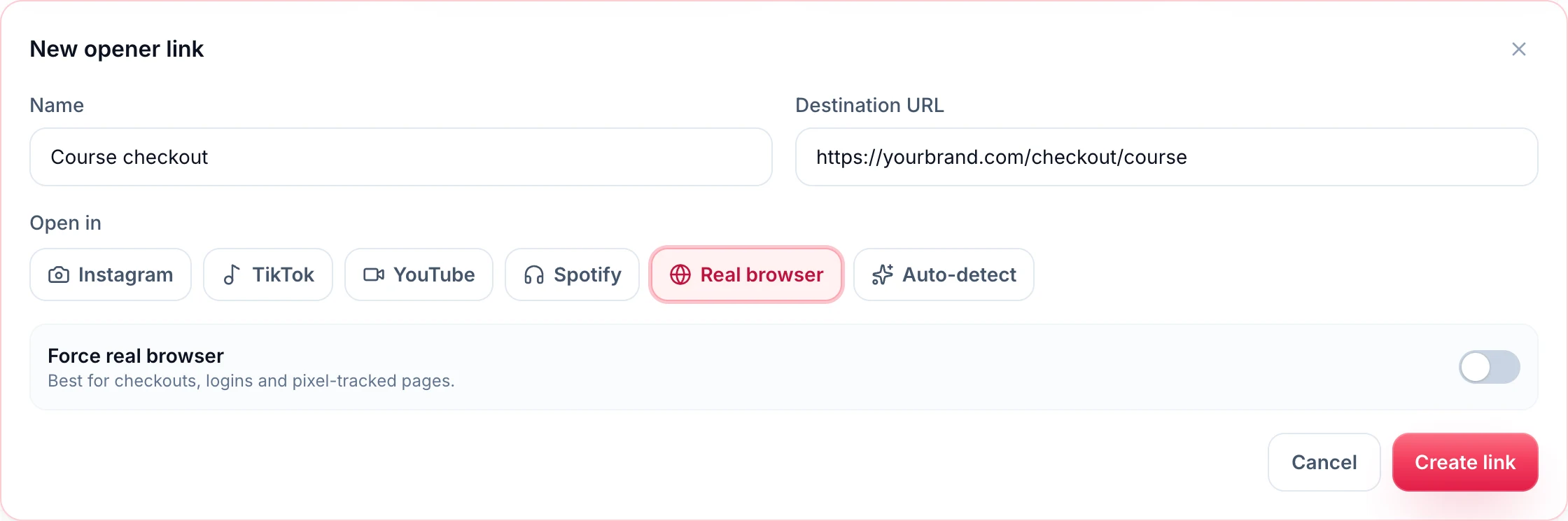
Step 1: Open App Opener
Sign in to DM Automata (or create a free account) and open App Opener from the dashboard. The page lists every opener link you have made with the number of opens each one has had.
Step 2: Click New opener link and name it
Click New opener link. Give the link a name you will recognise later, such as "Course checkout", "Latest YouTube video" or "Spotify single". The name also becomes the start of the short link's address.
Step 3: Paste the destination URL
Paste the full address you want people to reach, including https://. For YouTube, use a normal youtube.com or youtu.be link. For Spotify, use the Share, then Copy link address from the Spotify app. For Instagram, a profile, post or Reel link all work. The address must be a full web link; anything else is rejected before a link is created.
Step 4: Choose where it opens
Under Open in, leave Auto-detect on unless you want to override it, or choose Instagram, TikTok, YouTube, Spotify or Real browser using the table above as a guide.
Step 5: Switch on Force real browser for money pages
If the page is a checkout, a login, a sign-up form or anything with a tracking pixel you care about, turn on Force real browser. The dashboard describes it as "Best for checkouts, logins and pixel-tracked pages", and that is exactly when to use it: it overrides any app mode and always sends the tap to Chrome or Safari.
Step 6: Create, copy and test
Click Create link. You get a short link on dmautomata.link, like dmautomata.link/course-checkout-x7k2. Copy it with one click, and test it on a real phone before you share it (see the testing section below). Every tap is counted, so you can see which links your audience actually uses.
If you only need a one-off link and don't want an account, the free App Opener link generator on our website builds one from any URL in a couple of seconds. An account adds saved links, short dmautomata.link addresses and open counts.
Where to use app opener links
An app opener link is just a URL, so it works anywhere you can paste one. These are the placements that matter most for Instagram creators and brands.
In your bio link
Your bio link is tapped more than any other link you own, and every tap opens in the in-app browser. Put opener links on the buttons inside your smart bio link: YouTube in YouTube mode, your podcast in Spotify mode, your shop and booking pages in Real browser mode. A single bio page can mix all of them. If you are comparing bio link tools, our DM Automata vs Linktree page covers the differences.
In DMs from comment-to-DM automations
This is the placement with the most buying intent. When someone comments a keyword on your Reel and your automation sends them a link, that person asked for it. Losing them to a logged-out checkout is the worst possible outcome. Paste your opener link into the automation's link field and add button text, and it arrives as a tap-to-open button in the DM.
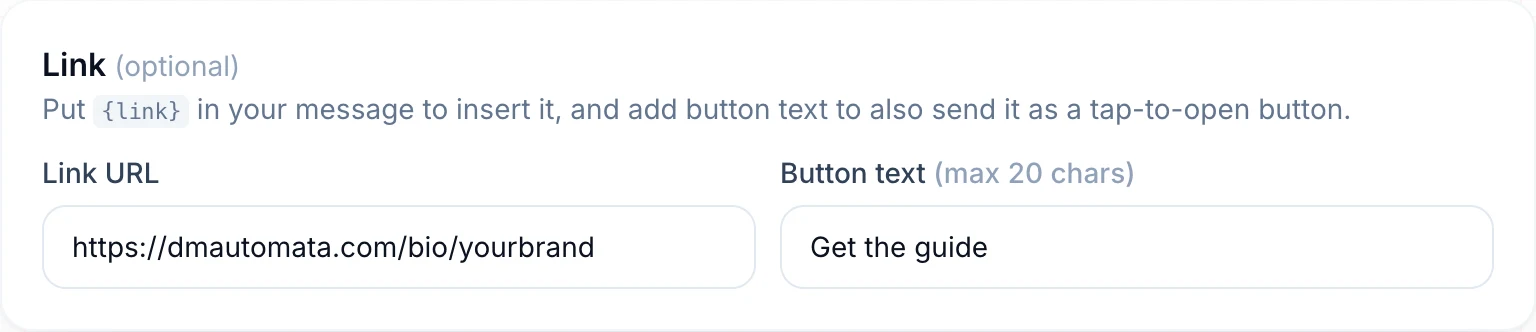
If you haven't set up comment-to-DM yet, the complete comment-to-DM guide walks through it step by step. If you sell courses, templates or presets this way, selling digital products in the DMs shows the full flow from comment to payment.
In stories
Story link stickers open in the in-app browser too. Use an opener link on the sticker for new video drops, music releases, launches and limited-time offers. Stories are short-lived and tapped on impulse, so removing the login step matters even more.
On other platforms
TikTok, Facebook, Threads, Snapchat, X and LinkedIn all have their own in-app browsers. Use the same opener links in your TikTok bio, YouTube descriptions, Facebook posts, Threads replies and newsletters. The Instagram mode is especially useful off Instagram: a link in your TikTok bio that opens your Instagram profile in the Instagram app turns a curious viewer into a follower in one tap.
Native-app mode or real-browser mode: which one to use
The rule is simple. Use native-app mode when the goal is an action inside another app, and real-browser mode when the goal is an action on a website.
- Native app: subscribe on YouTube, follow or save on Spotify, follow on TikTok or Instagram, watch a long video. The visitor is already signed into these apps, so the action is one tap.
- Real browser: buy a product, pay for a course, book a call, sign up for a trial, log in to a members' area, click an affiliate link. The real browser has the visitor's saved passwords, cards and addresses, and cookies persist, so attribution and affiliate credit survive.
- Leave it plain: a blog post or article people will read and close doesn't need an opener. The in-app browser is fine for reading.
If you are unsure, ask one question: does this page need the visitor to be signed in to something? If yes, route it out of the in-app browser.
How to test your app opener links on iPhone and Android
Deep links depend on the phone, the operating system version, the apps installed and the app the link is tapped from. Five minutes of testing saves a lot of lost taps.
Testing on iPhone
- Test from inside Instagram, not from Notes or Safari. Send the link to yourself in a DM from a second account, or add it to your bio, then tap it in Instagram. Links behave differently depending on where they are tapped.
- Test with the app installed and without it. Offload the YouTube or Spotify app (Settings, General, iPhone Storage) and tap the link again. You should land on the website after a moment.
- Expect a confirmation prompt sometimes. iOS may ask whether to open the other app. That is normal and still far better than a logged-out web page.
- Check a checkout link end to end. Tap it, confirm that saved cards or Apple Pay appear where your checkout supports them, and that you are signed in where you expect to be.
Testing on Android
- Check the app's link settings. In Settings, then Apps, then the app (for example YouTube), open "Open by default" and make sure supported links are allowed to open in the app.
- Check the default browser. Real-browser links open in whichever browser is set as default. Test with Chrome, and with Samsung Internet if your audience uses Samsung phones.
- Test from Instagram and from TikTok. Each app's in-app browser handles app handoffs slightly differently.
What to do if a link doesn't open the app
First, check that the URL is the app's own link format (for example a youtube.com or youtu.be link rather than a shortened link from another service, which Auto-detect can't recognise) and that Force real browser is off. Second, make sure the app is installed and signed in. If it still opens the website, the fallback is doing its job, and the visitor can still continue in the browser. Check the open count for the link over the following days to see how much traffic it gets.
Common mistakes with in-app browser links
- Using app mode for checkouts. A checkout page doesn't have an app to open. Use Real browser with Force real browser on.
- Relying on captions. "Open in browser for best experience" is an instruction most people skip. Fix the link instead.
- Using a link shortener in front of the opener. Every extra redirect is another chance for the in-app browser to keep hold of the tap. Share the opener link directly.
- Only fixing the bio link. DMs and story stickers usually carry your highest-intent traffic. Use opener links there too.
- Never testing. Always tap the link from inside Instagram on a real phone before you promote it.
Which app opener should you use?
Several tools create app opener links, including LinkTwin, URLgenius and a range of free web generators. Standalone app openers are fine if a link is all you need. The difference with DM Automata is that App Opener sits inside the same tool as your automations: the opener link you make is the same one your comment-to-DM flow sends, your bio link displays and your stories point to, and it is included on the Free plan, which also covers 1,000 automated DMs a month.
Paid plans add more Instagram accounts, more DMs, unlimited store products, scheduling, broadcasts and analytics. Pro is $14 a month; see pricing for every plan and limit.
Ready to stop losing taps? Create a free account, open App Opener, and turn your most important link, the one in your bio or your comment-to-DM automation, into a link that opens where your audience is already signed in.
Frequently asked questions
How do I open Instagram links in the app instead of the in-app browser?
Share an app opener link instead of the normal URL. When someone taps it inside Instagram, it hands the tap to the right native app, such as YouTube or Spotify, or to the phone's real browser, and falls back to the website if the app is not installed. You can create one free in DM Automata.
Why does the Instagram in-app browser hurt conversions?
It is a separate browser that nobody is signed into. Saved passwords, saved cards and one-tap wallets are often missing, cookies are kept apart from the phone's main browser, and apps like YouTube, Spotify and Amazon open as logged-out websites. Every extra step loses people, and attribution and affiliate credit can break.
Can people open an Instagram link in their browser themselves?
Yes. On iPhone they tap the three dots in the in-app browser and choose Open in external browser; on Android the menu offers to open the page in Chrome or the default browser. Most people never do it, which is why fixing the link itself works better.
What is the difference between a deep link and an app opener?
A deep link is an address that opens a specific screen inside an app, such as a YouTube video. An app opener is a tool that builds the right deep link for you from a normal URL, adds a browser fallback, and gives you a short link to share.
Should checkout links open in an app or in the real browser?
In the real browser. A checkout page has no app to open, and the real browser is where the visitor's saved cards, addresses and logins are. In DM Automata, choose Real browser and switch on Force real browser.
Is the DM Automata app opener free?
Yes. App Opener is included on the Free plan together with the smart bio link. There is also a free public generator on the DM Automata website that works without an account.