ManyChat pricing 2026: every plan, the real cost, and a cheaper Instagram alternative
Short answer
ManyChat has five plans in 2026: Free (25 active contacts), Essential at $17 a month, Pro at $39, Business at $99 and Advanced at $199, with lower prices billed yearly. Your real bill depends on active contacts: everyone your bot messages in a month counts, and extra contacts are charged as overage. For Instagram-only creators, DM Automata costs far less, from $0 to $14 a month for Pro, with no per-contact overage.
- ManyChat Free stops at 25 active contacts and 4 automations, with ManyChat branding.
- Overage runs from $0.10 to $0.004 per extra contact, so a viral Reel raises your bill.
- At 5,000 people a month, ManyChat's cheapest option is $99; DM Automata Pro is $14.
- ManyChat wins for WhatsApp, SMS and email. For Instagram, DM Automata is the better value.
ManyChat is the best-known name in Instagram DM automation, and its pricing is also one of the most misunderstood. The sticker price is only half the story: what you actually pay depends on how many people talk to your bot each month. This guide breaks down every ManyChat plan in 2026, explains the "active contacts" model in plain English, works out real monthly bills for different audience sizes, and shows when a cheaper Instagram-only tool is the smarter buy. Prices were checked on 25 September 2026.
ManyChat plans and prices in 2026
ManyChat moved to a five-plan model on 2 March 2026. Every paid plan is cheaper when billed yearly, and every plan includes a fixed number of active contacts.
| Plan | Monthly price | What's included |
|---|---|---|
| Free | $0 | 25 active contacts · 4 automations · “Powered by Manychat” branding |
| Essential | $17/mo | $14/mo yearly · 250 active contacts · no AI |
| Pro | $39/mo | $29/mo yearly · 2,500 active contacts · AI included |
| Business | $99/mo | $69/mo yearly · 7,500 active contacts |
| Advanced | $199/mo | $139/mo yearly · 25,000 active contacts |
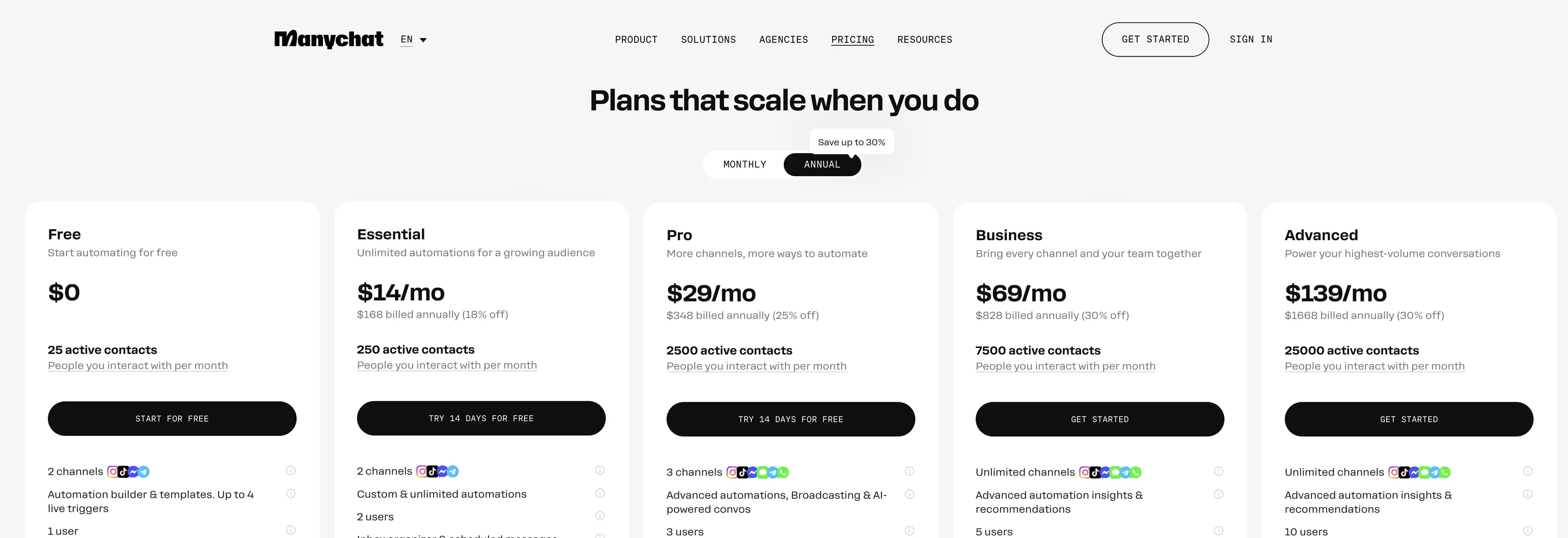
Billed yearly, the paid plans come to $168, $348, $828 and $1,668 a year. The Free plan carries "Powered by Manychat" branding on your messages and is limited to four live automations.
Monthly or yearly?
Paying yearly saves between 18% and 30% depending on the plan: Essential drops from $17 to $14 a month, Pro from $39 to $29, Business from $99 to $69 and Advanced from $199 to $139. The catch is that you commit to the plan size for twelve months, and overage is still billed on top whenever you go over. If your audience is still growing fast, a monthly plan keeps you flexible; if your volume is stable, yearly is the better deal.
What each plan is really for
- Free is a trial in all but name. At 25 active contacts, a single Reel that gets a few dozen comments uses it up.
- Essential removes the branding and the automation limit, but it has no AI and only 250 active contacts. It suits a very small account testing the waters.
- Pro is where most growing creators end up: AI features, 2,500 active contacts and more channels.
- Business adds team routing and every eligible channel, for brands with a support or sales team in the inbox.
- Advanced is for large audiences, with the lowest per-contact overage price.
What "active contacts" means for your bill
An active contact is anyone your ManyChat account interacts with during a billing month. Someone who comments your keyword and gets a DM counts. So does someone who replies to a story you've automated, or who receives a broadcast. It doesn't matter how many contacts sit in your list; it matters how many of them your bot talks to that month.
This model is fair for steady businesses, but it is unpredictable for creators, because creator traffic comes in spikes. One Reel that goes viral can pull thousands of commenters into your DMs in a weekend, and every one of them is an active contact. When you go over your plan's allowance, ManyChat bills each extra contact at a per-contact overage rate:
| Plan | Included active contacts | Each extra contact |
|---|---|---|
| Essential | 250 | $0.10 |
| Pro | 2,500 | $0.05 |
| Business | 7,500 | $0.025 |
| Advanced | 25,000 | $0.004 |
That is the single most important thing to understand about ManyChat pricing: your bill grows with your success. The better a post performs, the more you pay that month.
What ManyChat really costs: worked examples
Here is the cheapest ManyChat option at four audience sizes, using the plan prices and overage rates above. Each row picks whichever is cheaper: paying overage on a smaller plan, or moving up a plan.
| People you DM in a month | Cheapest ManyChat option | ManyChat monthly bill | DM Automata |
|---|---|---|---|
| 200 | Essential | $17 | $0 (Free) |
| 2,000 | Pro | $39 | $14 (Pro) |
| 5,000 | Business (Pro plus overage would be $164) | $99 | $14 (Pro) |
| 20,000 | Advanced (Business plus overage would be $411.50) | $199 | $39 (Business) |
The two tools measure usage differently, so this is a like-for-like estimate rather than an exact match: ManyChat counts active contacts per month, while DM Automata sets a monthly DM allowance and a total contact count per plan. DM Automata Pro includes 25,000 DMs a month and 10,000 contacts; Business includes 100,000 DMs and 50,000 contacts. Neither DM Automata plan charges per-contact overage. At every size above, an Instagram-focused creator pays several times less with DM Automata.
Work out your own ManyChat bill (a simple calculator)
You don't need a special tool to estimate ManyChat's cost. Use this three-step formula with your own numbers:
- Estimate your monthly active contacts. Add up everyone your automations will message in a typical month: comment-to-DM replies, story replies, DM keyword replies and broadcast recipients. If you have an average of 800 commenters per Reel and post four Reels a month, that is about 3,200 before stories and broadcasts.
- Price each plan with overage. For each plan: monthly price + (your contacts − included contacts) × the overage rate. Ignore the overage part if you're under the allowance.
- Pick the lowest number, then add 50%. Creator traffic is spiky. Budgeting for a month half again as big as your average is what stops a viral post from becoming a nasty surprise.
Example: 3,200 contacts on Pro is $39 + (3,200 − 2,500) × $0.05 = $74. On Business it is a flat $99. So Pro is cheaper in an average month, but a month with 5,000 or more contacts makes Business the better deal. With DM Automata the same creator stays on Pro at $14, and the number doesn't move when a Reel takes off.
ManyChat pricing outside the US
ManyChat publishes its prices in US dollars and bills the same plans worldwide. For creators in India, Southeast Asia, Latin America and much of Europe, that means paying a US price that doesn't reflect local incomes, plus possible card fees for a foreign-currency payment. A $39 Pro plan is a small expense for a US agency, but it is a serious monthly cost for a creator earning in rupees or pesos.
DM Automata takes a different approach: it sets fixed local prices in many countries, adjusted for purchasing power, so the same Pro plan costs noticeably less where incomes are lower. You see your local price on the pricing page automatically, and you are charged in your local currency where it is supported.
The costs people miss
- Spikes land on your card. Overage is automatic. A viral month can cost more than a year of a flat-priced tool.
- AI is not in the entry plan. Essential has no AI features, so the realistic starting price for AI-assisted replies is the Pro plan.
- WhatsApp messages cost extra. If you use ManyChat for WhatsApp, Meta's own per-message template fees are charged on top of your plan.
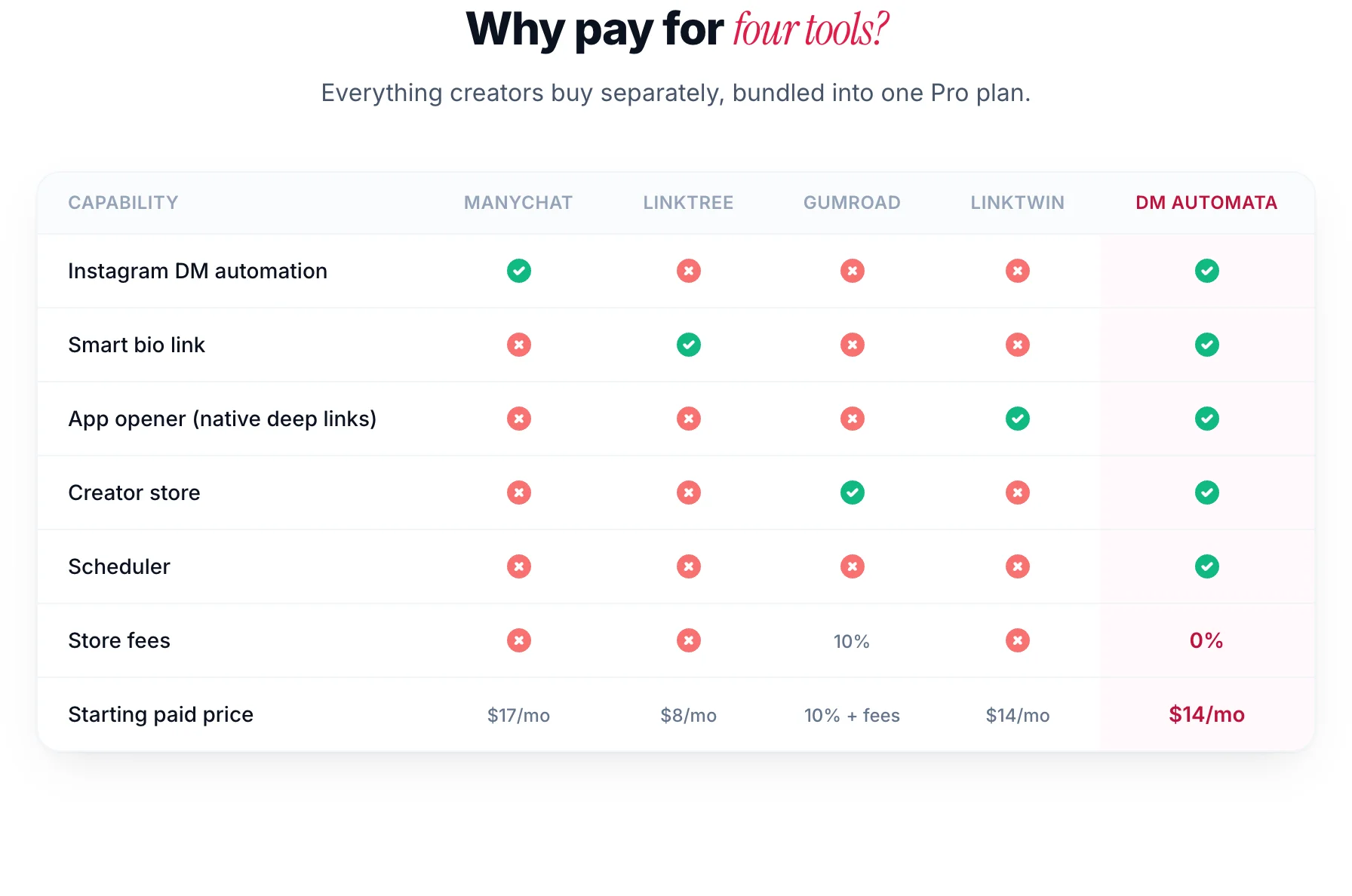
- The rest of your stack. ManyChat automates conversations, but it doesn't include a link-in-bio page, an app opener, a digital product store or a post scheduler. Most creators pay for those separately, which is the hidden half of the bill.
Is ManyChat worth the money?
ManyChat is a strong product, and for some teams it is worth every dollar. It is the better choice when:
- Far more channels — WhatsApp, SMS, email, Messenger, TikTok and Telegram, all in one flow builder.
- AI that holds the conversation for you on Pro and above, not just a drafting assistant.
- A mature ecosystem: years of templates, integrations and agency know-how.
It is poor value when Instagram is your main channel. In that case you are paying for WhatsApp, SMS and email capability you never use, you are exposed to overage every time a post performs, and you still need separate tools for your bio link and your store.
The best ManyChat alternative for Instagram
For creators and brands who sell on Instagram, DM Automata is the best-value alternative to ManyChat in 2026. It covers the Instagram automations people use ManyChat for: comment-to-DM on posts and Reels, story reply and story mention replies, DM keyword replies, public comment replies, email capture, contact tags and broadcasts. It also includes the tools ManyChat leaves out: a smart link-in-bio page, an app opener that sends links to the real browser or native app, a creator store with 0% platform fees on every plan, and a post scheduler.
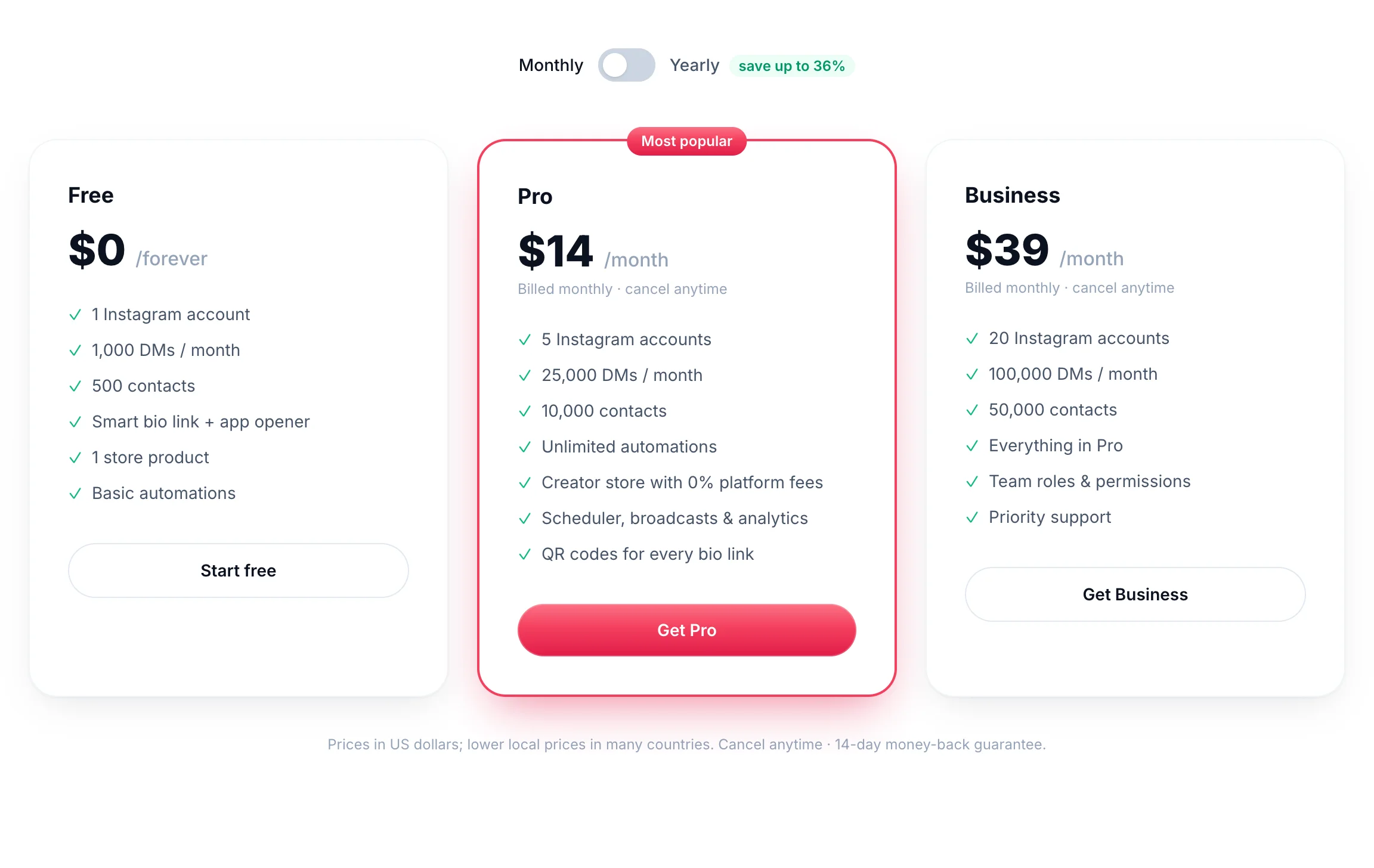
- A free plan you can actually use: 1,000 DMs a month and 500 contacts, against ManyChat Free's 25 active contacts.
- Pro at $14 a month with five Instagram accounts, against ManyChat Pro at $39 for one.
- No per-contact overage fees. A viral Reel doesn't change your bill.
- Approved Meta Tech Provider. It runs only on the official Instagram API, connects with Instagram Login and never asks for your password.
- Local prices in many countries, so the price is fair wherever you are.
If you'd like the full, honest feature-by-feature comparison, including the places where ManyChat is the stronger tool, read DM Automata vs ManyChat. For the wider market, see the best Instagram DM automation tools and what each free plan really includes.
How to switch from ManyChat without losing momentum
- List your live flows. Note each keyword, the post it runs on, the DM text and any link.
- Connect Instagram to DM Automata with Instagram Login. You can keep ManyChat connected while you test.
- Rebuild your top flows from templates. Most ManyChat Instagram flows map directly to a DM Automata template: comment to DM link, lead magnet delivery, giveaway entries, book a call. Our comment-to-DM setup guide walks through every field.
- Switch one post at a time. Pause the flow in ManyChat, set it live in DM Automata, and test with a second account.
- Cancel ManyChat once every flow is running, before your next billing date.
Most creators with a handful of keyword flows are fully moved over in an afternoon.
The bottom line
ManyChat pricing starts at $17 a month, but the price that matters is what you pay in your best month, because active contacts and overage scale with your reach. If you run multi-channel bots with a team, ManyChat earns its price. If Instagram is where you grow and sell, DM Automata does the same Instagram job, adds your bio link, app opener, store and scheduler, and costs a fraction as much, with a free plan to start.
Frequently asked questions
Is ManyChat free?
ManyChat has a free plan, but it is limited to 25 active contacts a month and four live automations, and messages carry ManyChat branding. Most Instagram creators outgrow it with their first successful Reel.
How much does ManyChat cost per month?
Essential is $17 a month, Pro $39, Business $99 and Advanced $199, or $14, $29, $69 and $139 a month billed yearly. Extra active contacts above your plan are billed as overage.
What counts as an active contact in ManyChat?
Anyone your ManyChat account interacts with during the billing month, for example someone who gets a comment-to-DM reply, a story reply or a broadcast.
Why did my ManyChat bill go up?
Usually a post performed well. More commenters means more active contacts, and contacts above your plan allowance are charged at the overage rate.
What is the cheapest ManyChat alternative for Instagram?
DM Automata. Its free plan includes 1,000 DMs a month, Pro is $14 a month with five Instagram accounts, and it has no per-contact overage. It also includes a bio link, app opener, store and scheduler.
Can I use DM Automata and ManyChat at the same time?
Yes, while you switch. Avoid running the same keyword on the same post in both tools, or commenters will get two DMs.